
Public transport plays a vital role in helping residents and tourists navigate cities efficiently. Abu Dhabi’s Hafilat card system provides a convenient, cashless way to pay for bus services, ensuring smooth and hassle-free travel. Whether you’re a daily commuter or an occasional traveler, managing your Hafilat card balance is essential to avoid disruptions during your journey. With multiple options, such as Hafilat balance check and Hafilat recharge online or offline, users can stay updated and enjoy seamless commuting.
Hafilat Balance Check And Recharge
What is the Hafilat Card
The Hafilat card is a smart, contactless card used for public transport payments in Abu Dhabi, primarily for buses. It allows passengers to travel without carrying cash and ensures quick and efficient boarding. The card is linked to your travel account, which can be topped up as needed, making commuting more convenient.
Hafilat cards are available for both regular passengers and students, offering flexibility for different travel needs. With this card, users can access real-time information about their travel expenses and monitor their Hafilat card balance. It is an essential tool for anyone relying on Abu Dhabi’s public transportation system, offering a blend of safety, speed, and convenience. The card can also be recharged easily through various online and offline methods.
How Does Hafilat Card Work?
The Hafilat system uses contactless smart card technology. Once you add credit to your card, the balance is stored electronically and used to pay bus fares automatically.
A typical journey follows these steps:
Your remaining balance stays on the card until your next trip.
If your balance becomes too low, you can recharge your Hafilat Card through the official website, mobile application, ticket vending machines, or authorized recharge locations.
The system records each successful transaction, allowing passengers to review their available balance and recharge activity through supported platforms.
Ways to Check Your Hafilat Card Balance in 2026
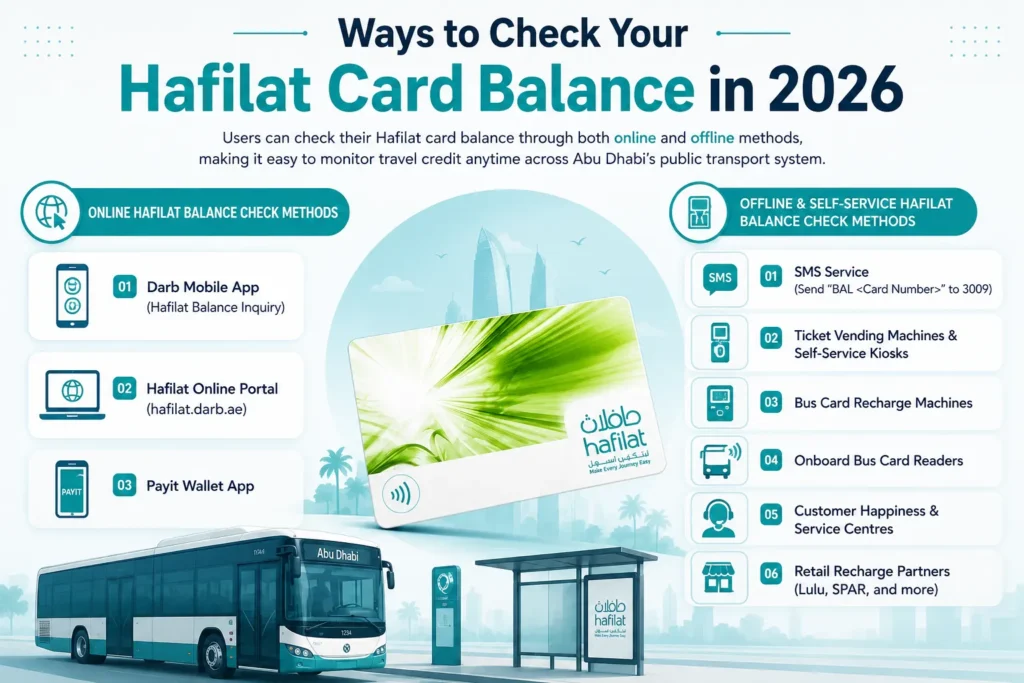
Users can check their Hafilat card balance through both online and offline methods, making it easy to monitor travel credit anytime across Abu Dhabi’s public transport system.
Online Hafilat Balance Check Methods
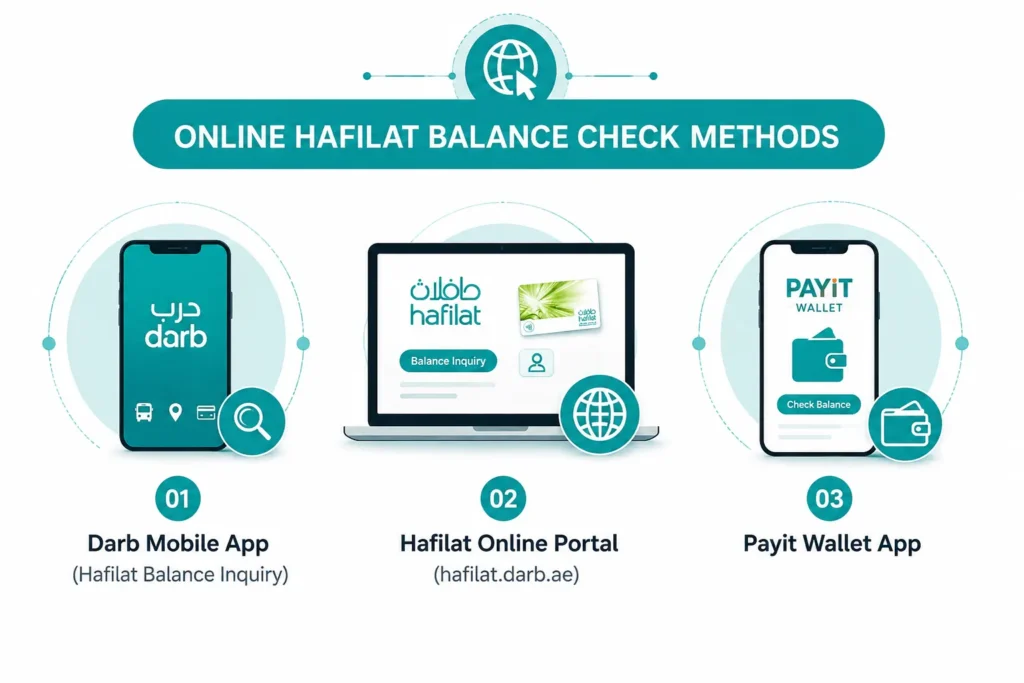
- Darb Mobile App (Hafilat Balance Inquiry)
- Hafilat Online Portal (hafilat.darb.ae)
- Payit Wallet App
Offline & Self-Service Hafilat Balance Check Methods
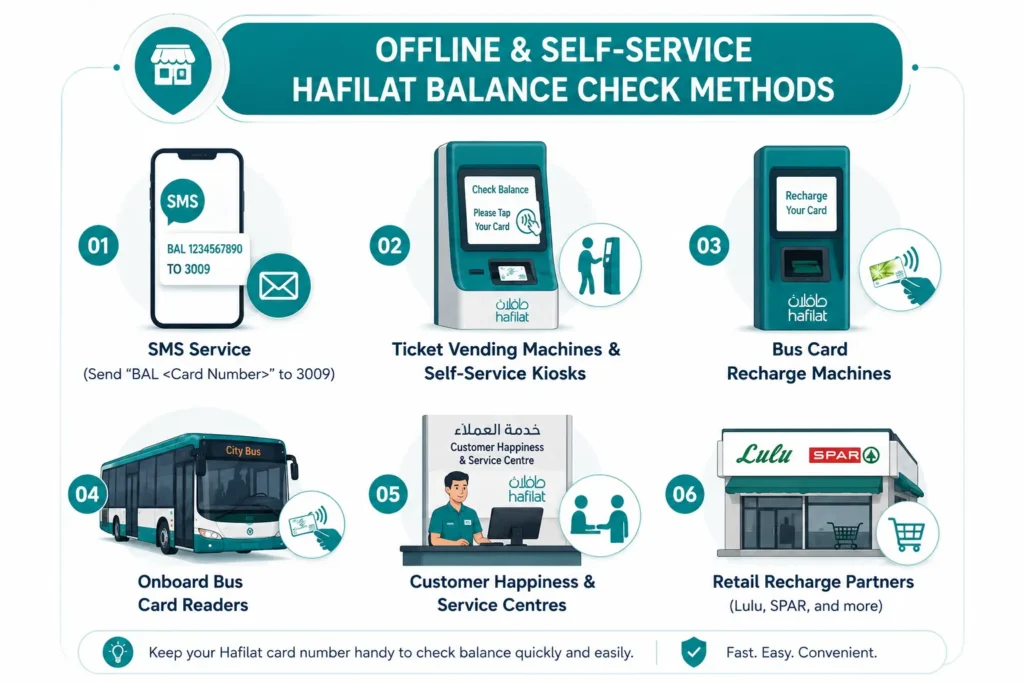
- SMS Service (Send “BAL ” to 3009)
- Ticket Vending Machines & Self-Service Kiosks
- Bus Card Recharge Machines
- Onboard Bus Card Readers
- Customer Happiness & Service Centres
- Retail Recharge Partners (Lulu, SPAR, and more)
Online Hafilat Balance Check Methods
Hafilat Card Balance Check via the Darb Website
Checking your Hafilat card balance online through the official Darb platform is one of the fastest and most reliable methods available in Abu Dhabi. The system allows users to view their remaining balance, recent travel activity, recharge history, and card details in just a few minutes. Whether you are a daily commuter, student, or visitor using Abu Dhabi public transport, the Darb portal provides a secure way to manage your Hafilat account online.
Step 1: Visit the Official Darb Platform
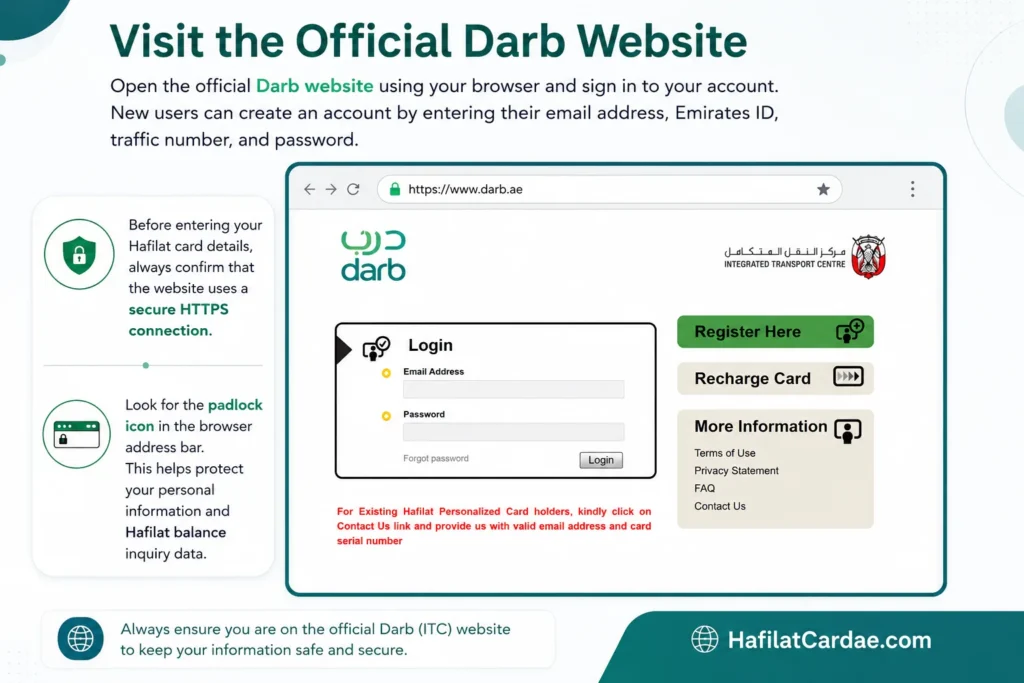
Open the official Darb website using your browser and sign in to your account. New users can create an account by entering their email address, Emirates ID, traffic number, and password.
Its official website can be accessed using this URL (https://hafilat.darb.ae/Identification.aspx)
Before entering your Hafilat card details, always confirm that the website uses a secure HTTPS connection and displays the padlock icon in the browser address bar. This helps protect your personal information and Hafilat balance inquiry data.
Step 2: Open the Hafilat Card Services Section
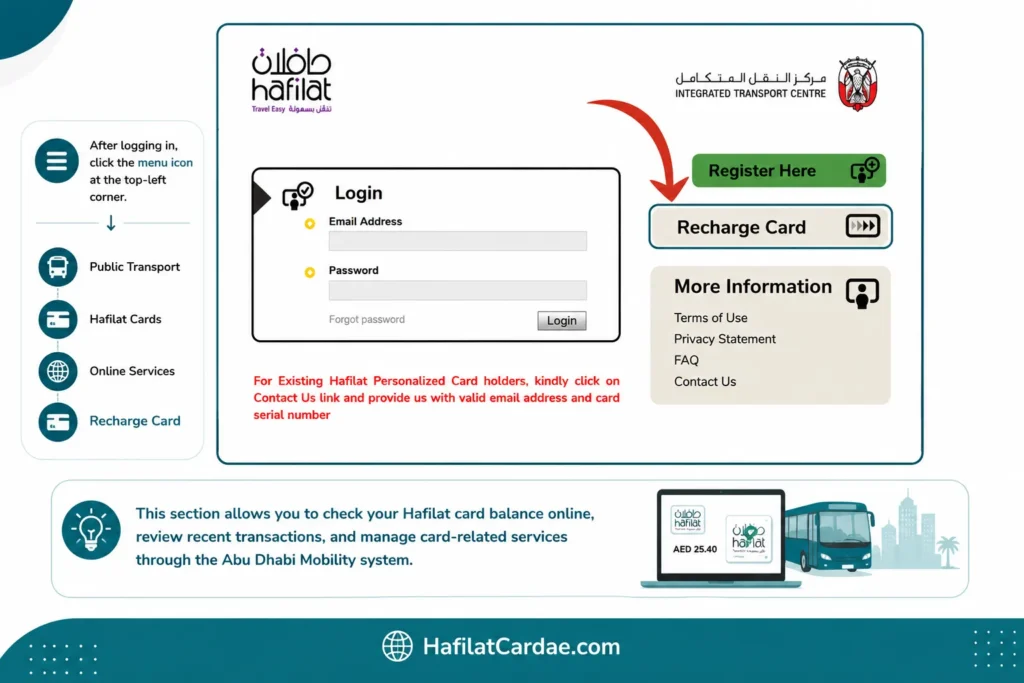
After logging in, click the menu icon located at the top-left corner of the website. Navigate to:
Public Transport → Hafilat Cards → Online Services → Recharge Card
This section allows users to check their Hafilat card balance online, review recent transactions, and manage card-related services through the Abu Dhabi Mobility system.
Step 3: Enter Your Hafilat Card Number
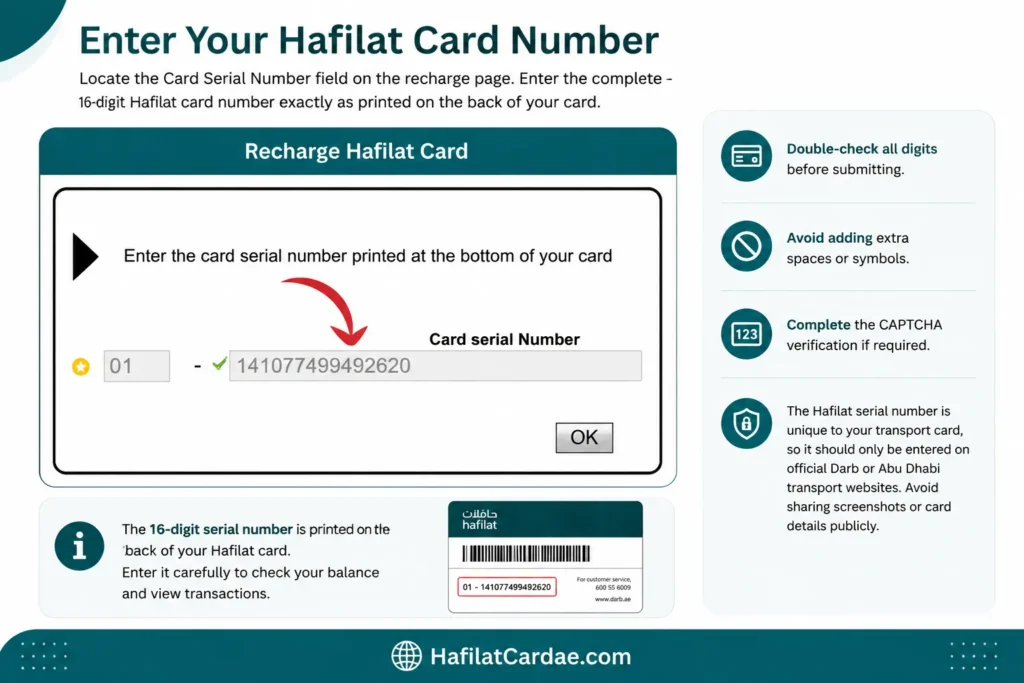
Locate the Card Serial Number field on the recharge page. Enter the complete 16-digit Hafilat card number exactly as printed on the back of your card.
- Double-check all digits before submitting
- Avoid adding extra spaces or symbols
- Complete the CAPTCHA verification if required
The Hafilat serial number is unique to your transport card, so it should only be entered on official Darb or Abu Dhabi transport websites. Avoid sharing screenshots or card details publicly.
Step 4: View Your Hafilat Card Balance
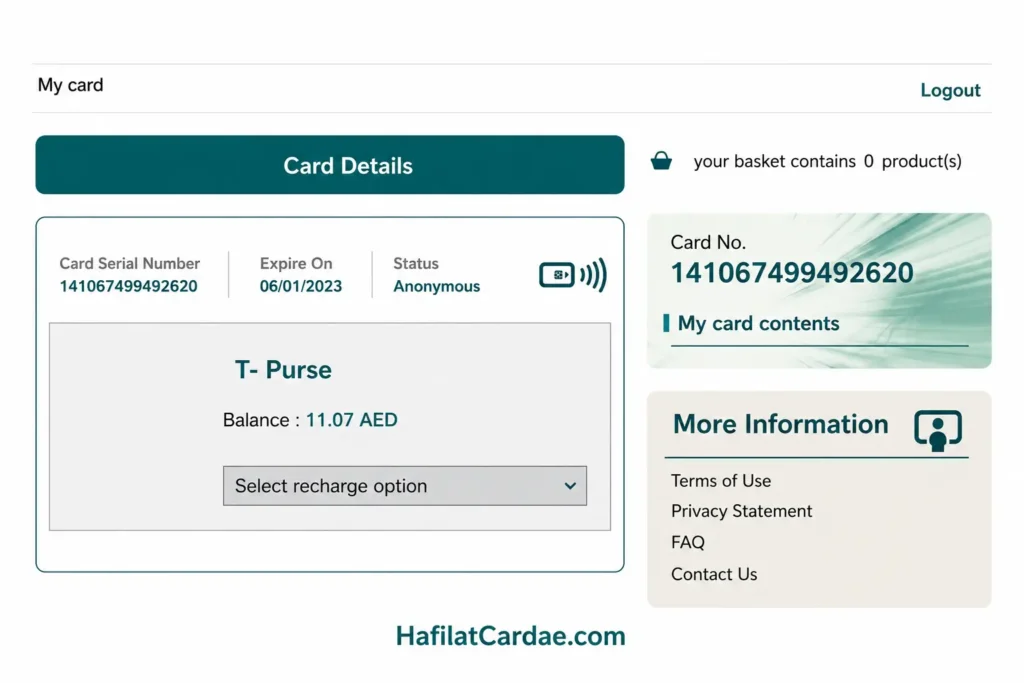
Click the Submit button to continue. The system will instantly display your Hafilat balance and related card information, including:
- Available balance in AED
- Card expiry date
- Recent travel transactions
- Recharge history
- Bus route or trip details (where available)
This online Hafilat balance check method helps passengers monitor travel spending, manage top-ups, and avoid low-balance interruptions while using Abu Dhabi buses.
Helpful Tips for Hafilat Online Balance Inquiry
- Use a desktop browser for a clearer transaction history view
- Keep your 16-digit Hafilat card number secure
- Check supported online payment methods before recharging
- Save a screenshot of your balance details for future reference
- Review your card expiry date regularly to avoid service issues
The Darb platform remains one of the most convenient ways to perform a Hafilat card balance check online in 2026, especially for users who prefer managing their public transport account digitally.
Hafilat Balance Check Using the Darb Mobile App
The Darb mobile application offers one of the easiest ways to check your Hafilat card balance directly from your smartphone. The app allows Abu Dhabi public transport users to monitor travel credit, recharge their Hafilat card, review recent transactions, and manage their transport account anytime. Whether you are using Android or iPhone, the Darb app provides a fast and secure Hafilat balance inquiry experience without visiting a ticket machine or customer service center.
Step 1: Download the Official Darb App
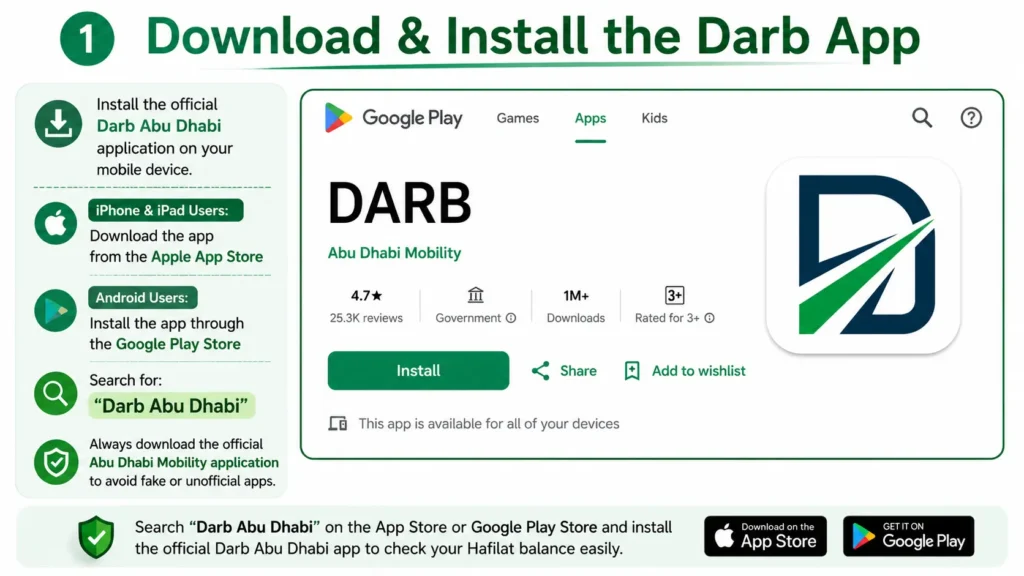
Install the official Darb Abu Dhabi application on your mobile device.
- iPhone & iPad Users: Download the app from the Apple App Store
- Android Users: Install the app through the Google Play Store
Search for:
“Darb Abu Dhabi”
Always download the official Abu Dhabi Mobility application to avoid fake or unofficial apps.
Step 2: Sign In or Create Your Account
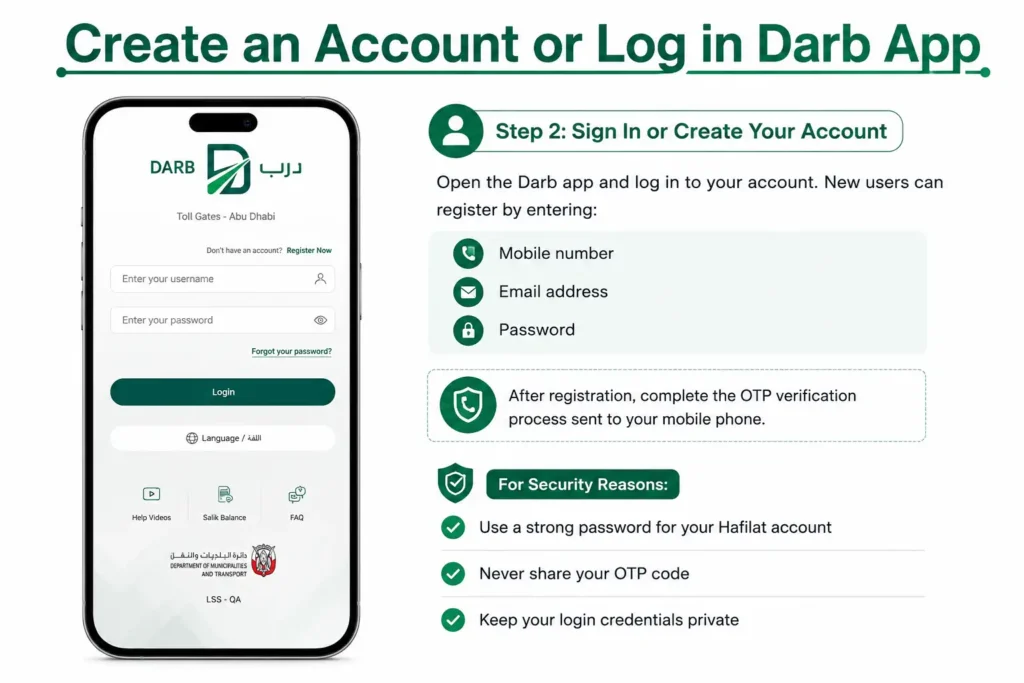
Open the Darb app and log in to your account. New users can register by entering:
- Mobile number
- Email address
- Password
After registration, complete the OTP verification process sent to your mobile phone.
For security reasons:
- Use a strong password for your Hafilat account
- Never share your OTP code
- Keep your login credentials private
Step 3: Link Your Hafilat Card

After logging in, add your Hafilat card to the app.
Follow these steps:
- Tap the “+” icon on the home screen
- Select Recharge Hafilat Card
- Enter your 16-digit Hafilat card serial number
- Tap Add Card
The card serial number must match the number printed on the back of your Hafilat card exactly. Even a small mistake can prevent the card from being linked successfully.
Step 4: View Your Hafilat Balance
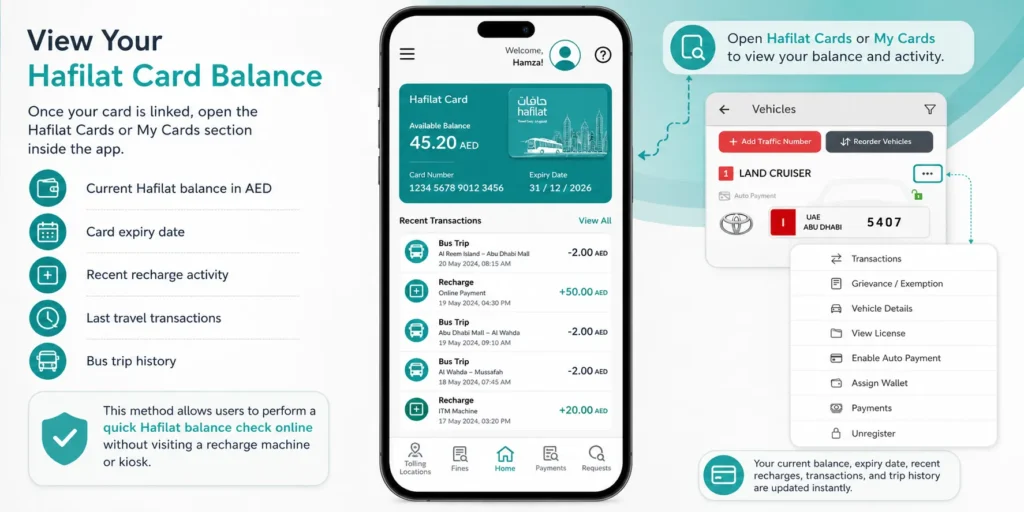
Once your card is linked, open the Hafilat Cards or My Cards section inside the app.
You can instantly view:
- Current Hafilat balance in AED
- Card expiry date
- Recent recharge activity
- Last travel transactions
- Bus trip history
This method allows users to perform a quick Hafilat card balance check online without visiting a recharge machine or kiosk.
Step 5: Manage Your Hafilat Account
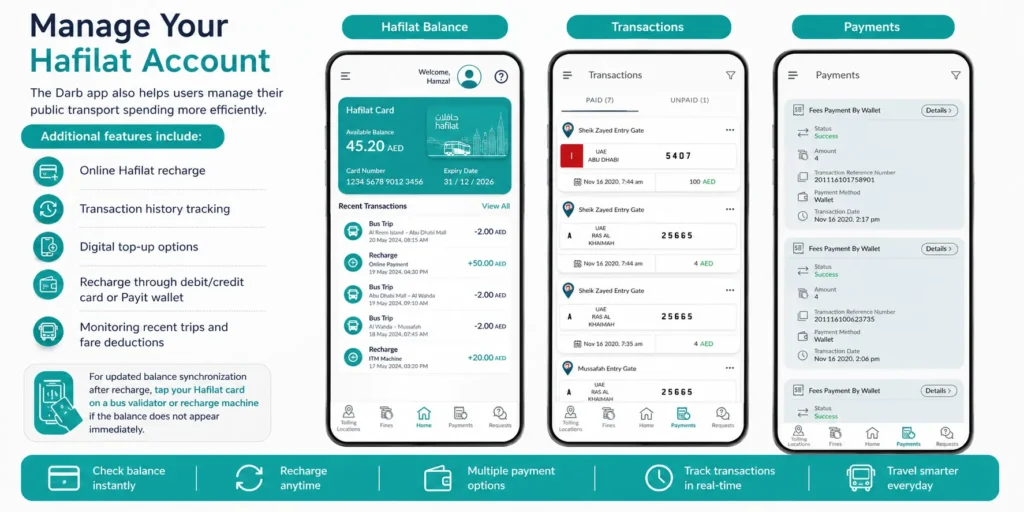
The Darb app also helps users manage their public transport spending more efficiently.
Additional features include:
- Online Hafilat recharge
- Transaction history tracking
- Digital top-up options
- Recharge through debit/credit card or Payit wallet
- Monitoring recent trips and fare deductions
For updated balance synchronization after recharge, tap your Hafilat card on a bus validator or recharge machine if the balance does not appear immediately.
Using the Darb mobile app is one of the most convenient Hafilat balance check methods in 2026, especially for passengers who prefer managing Abu Dhabi transport services digitally.
How to Check Hafilat Balance via the Payit Wallet App
The Payit Wallet app provides another convenient way to check your Hafilat card balance online in Abu Dhabi. Users can quickly monitor travel credit, recharge their Hafilat card, and review recent transactions directly from their smartphone. The app is designed to make public transport payments faster, safer, and more convenient for daily commuters.
Step 1: Download or Update the Payit App
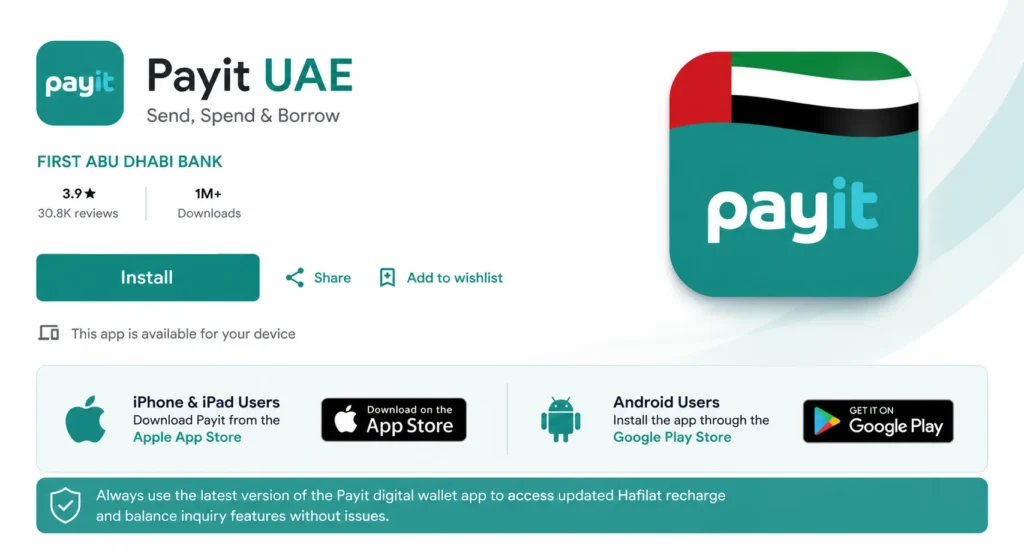
Install the official Payit UAE application on your mobile device.
- iPhone & iPad Users: Download Payit from the Apple App Store
- Android Users: Install the app through the Google Play Store
Always use the latest version of the Payit digital wallet app to access updated Hafilat recharge and balance inquiry features without issues.
Step 2: Sign In or Create Your Payit Account
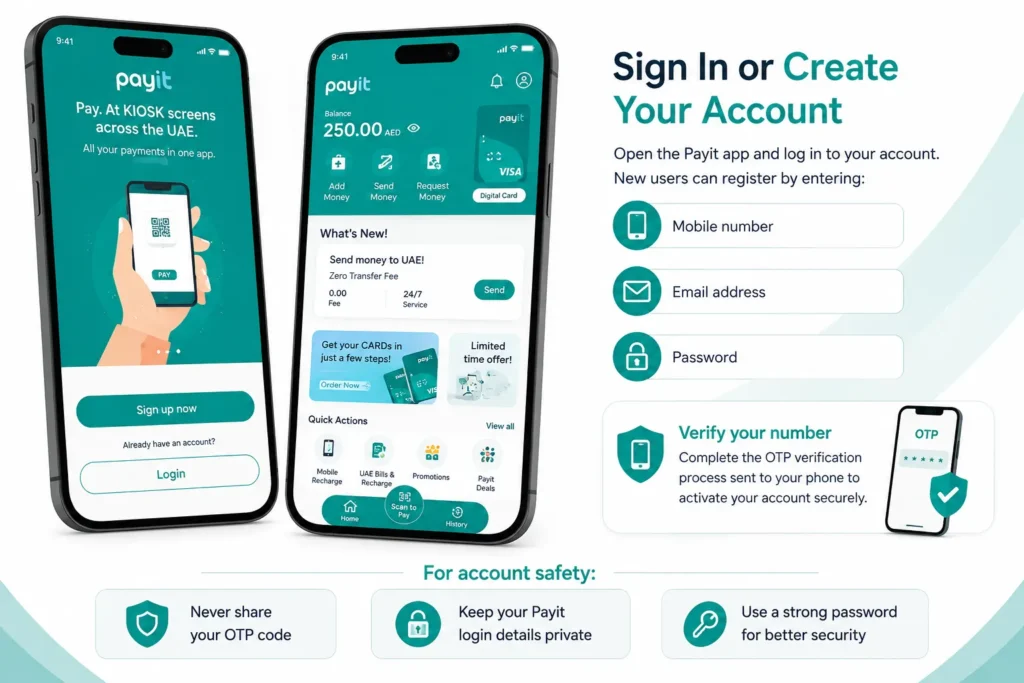
Open the Payit app and log in to your account. New users can register by entering:
- Mobile number
- Email address
- Password
Complete the OTP verification process sent to your phone to activate your account securely.
For account safety:
- Never share your OTP code
- Keep your Payit login details private
- Use a strong password for better security
Step 3: Open Hafilat Services
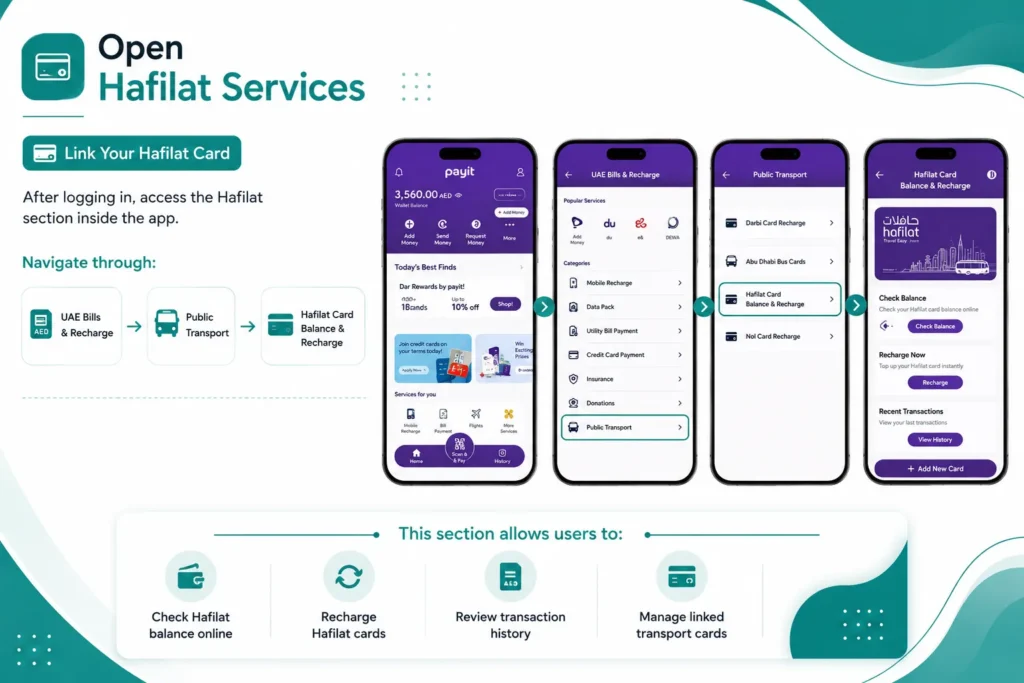
After logging in, access the Hafilat section inside the app.
Navigate through:
UAE Bills & Recharge → Public Transport → Hafilat Card Balance & Recharge
This section allows users to:
- Check Hafilat balance online
- Recharge Hafilat cards
- Review transaction history
- Manage linked transport cards
Step 4: Link Your Hafilat Card
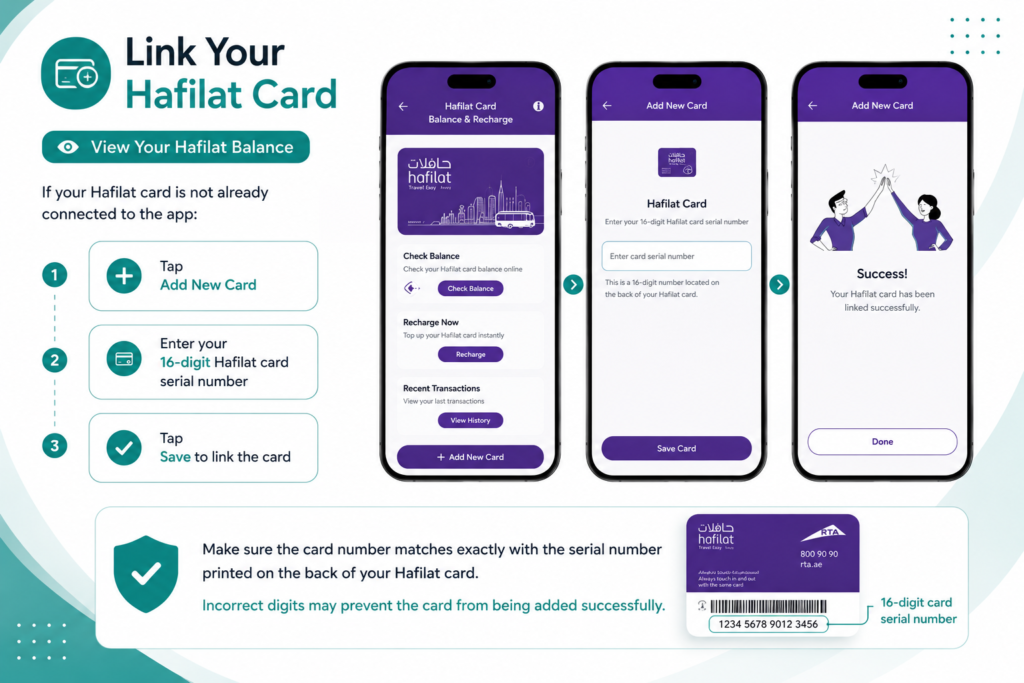
If your Hafilat card is not already connected to the app:
- Tap Add New Card
- Enter your 16-digit Hafilat card serial number
- Tap Save to link the card
Make sure the card number matches exactly with the serial number printed on the back of your Hafilat card. Incorrect digits may prevent the card from being added successfully.
Step 5: Check Hafilat Balance & Card Details
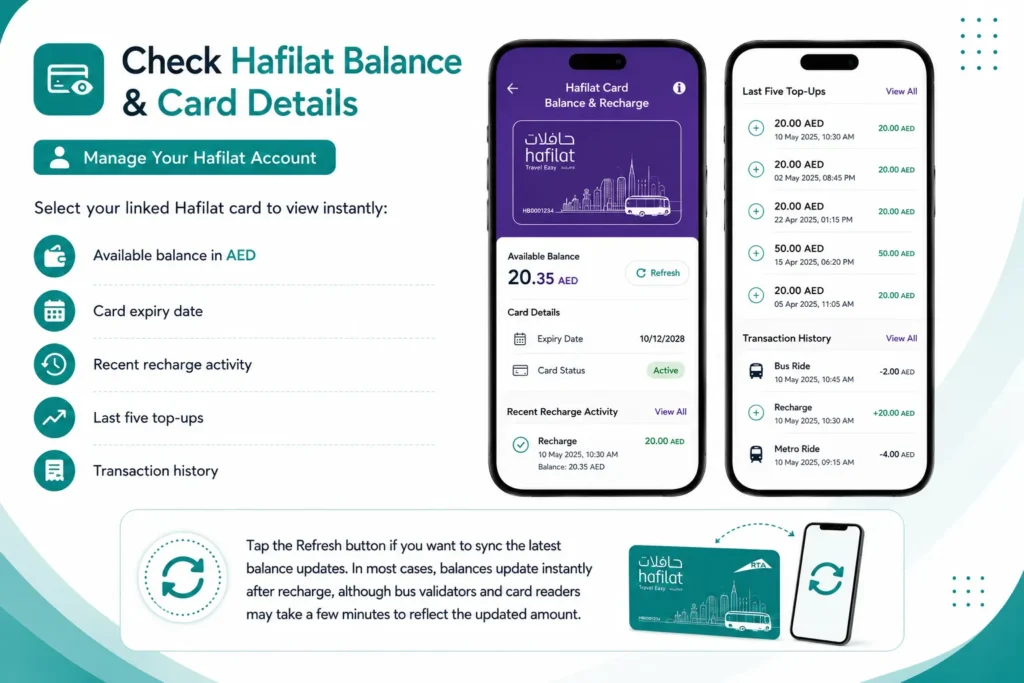
Select your linked Hafilat card to view instantly:
- Available balance in AED
- Card expiry date
- Recent recharge activity
- Last five top-ups
- Transaction history
Tap the Refresh button if you want to sync the latest balance updates. In most cases, balances update instantly after recharge, although bus validators and card readers may take a few minutes to reflect the updated amount.
Using the Payit Wallet app is one of the easiest ways to manage your Hafilat account digitally, helping passengers travel smoothly across Abu Dhabi’s public transport network without worrying about low balance issues.
Offline Hafilat Balance Check Methods
Hafilat Card Balance Check via SMS
Checking your Hafilat card balance through SMS is one of the quickest offline methods for Abu Dhabi public transport users. This option is useful when you do not have internet access or cannot use the Darb app or online portal.
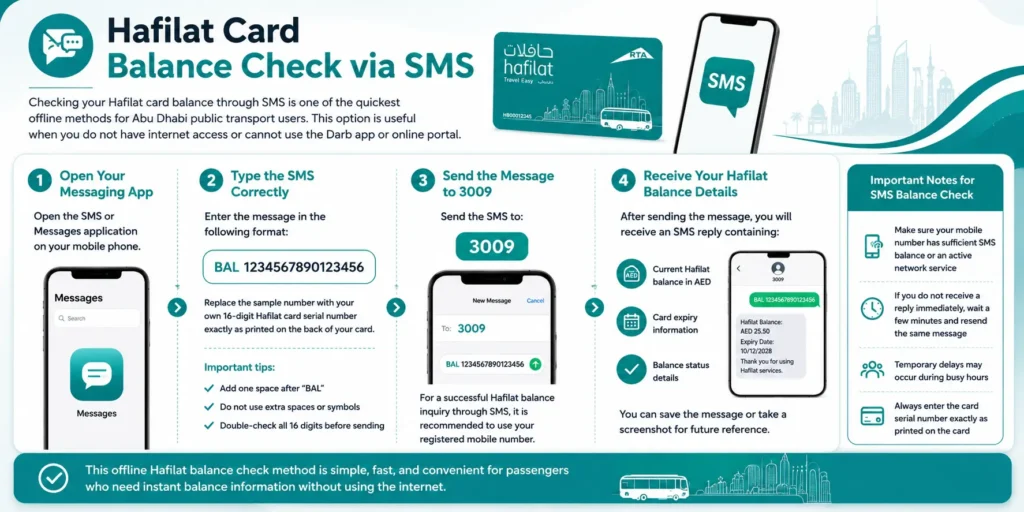
Step 1: Open Your Messaging App
Open the SMS or Messages application on your mobile phone.
Step 2: Type the SMS Correctly
Enter the message in the following format:
- BAL 1234567890123456
Replace the sample number with your own 16-digit Hafilat card serial number exactly as printed on the back of your card.
Important tips:
- Add one space after “BAL”
- Do not use extra spaces or symbols
- Double-check all 16 digits before sending
Step 3: Send the Message to 3009
Send the SMS to:
- 3009
For a successful Hafilat balance inquiry through SMS, it is recommended to use your registered mobile number.
Step 4: Receive Your Hafilat Balance Details
After sending the message, you will receive an SMS reply containing:
- Current Hafilat balance in AED
- Card expiry information
- Balance status details
You can save the message or take a screenshot for future reference.
Important Notes for SMS Balance Check
- Make sure your mobile number has sufficient SMS balance or an active network service
- If you do not receive a reply immediately, wait a few minutes and resend the same message
- Temporary delays may occur during busy hours
- Always enter the card serial number exactly as printed on the card
This offline Hafilat balance check method is simple, fast, and convenient for passengers who need instant balance information without using the internet.
Hafilat Balance Check at Ticket Vending Machines (TVM)
Passengers who prefer offline services can easily perform a Hafilat balance check at Ticket Vending Machines (TVMs) available across Abu Dhabi’s public transport network. These self-service machines provide a fast and secure way to check Hafilat card balance, recharge travel credit, print receipts, and manage transport cards without using the Darb app or internet connection.
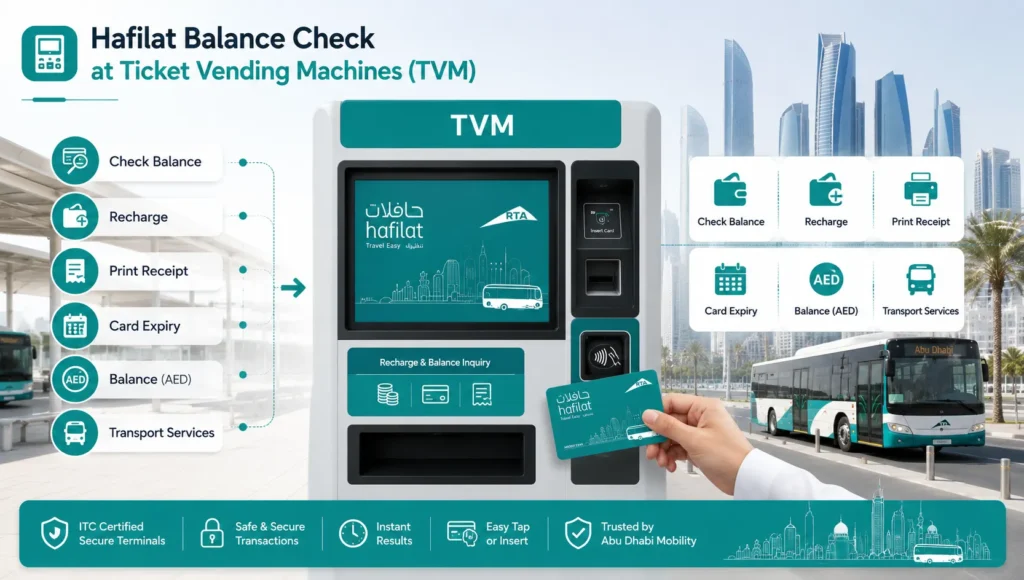
This method is especially useful for daily commuters, tourists, students, and intercity travelers who need instant access to their Hafilat card balance before boarding Abu Dhabi buses.
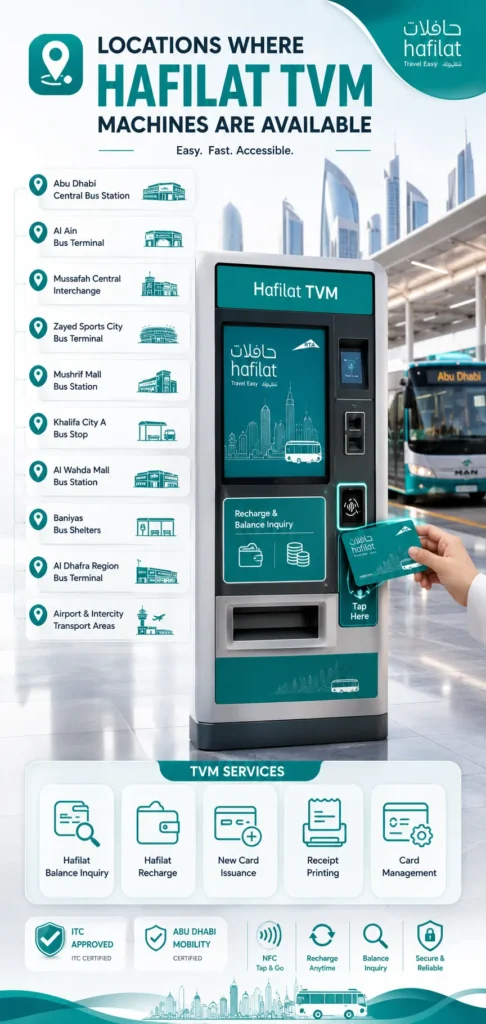
Locations Where Hafilat TVM Machines Are Available
You can find Hafilat ticket vending machines at several major transport hubs and bus terminals across Abu Dhabi, including:
- Abu Dhabi Central Bus Station
- Al Ain Bus Terminal
- Mussafah Central Bus Interchange
- Zayed Sports City Bus Terminal
- Mushrif Mall Bus Station
- Khalifa City A Bus Stop
- Al Wahda Mall Bus Station
- Baniyas Bus Shelters
- Al Dhafra Region Bus Terminal
- Intercity transport stations and airport bus transfer areas
These ITC-approved and Abu Dhabi Mobility-certified machines support:
- Hafilat balance inquiry
- Hafilat recharge services
- New Hafilat card issuance
- Transaction receipt printing
- Public transport card management
Step 1: Locate a Hafilat Ticket Vending Machine
Find a nearby TVM machine inside bus stations, transport terminals, or interchange locations. Most machines are installed near station entrances, waiting areas, or beside route information boards.
Look for labels such as:
- Recharge & Balance Inquiry
- Hafilat Services
- Self-Service Kiosk
- TVM Machine
These machines operate throughout the day and provide quick access to Hafilat card services for Abu Dhabi bus passengers.
Step 2: Activate the Machine and Select Your Language
Tap the screen or press any button to start the machine interface.
Choose your preferred language:
- English
- Arabic
Selecting English makes the balance inquiry process easier for users who are not comfortable with Arabic navigation menus.
Step 3: Insert or Tap Your Hafilat Card
Locate the card reader section on the machine.
Depending on the TVM model, you can:
- Insert the Hafilat card into the card slot
- Tap the card on the NFC/contactless reader
Wait a few seconds while the system reads your Hafilat card details.
Important:
Always insert the card correctly by following the arrow direction or chip placement instructions displayed on the machine.
Step 4: Select “Hafilat Balance Inquiry”
From the main menu, tap:
- Balance Inquiry
- Check Hafilat Balance
- Card Information
The machine will instantly process your request and display your Hafilat card balance information.
Checking your Hafilat balance through TVMs is completely free and does not deduct any fare or service fee.
Step 5: View Your Hafilat Card Balance Details
After processing, the screen will display important transport card information, including:
- Current Hafilat balance in AED
- Card expiry date
- Recharge history
- Recent transaction details
- Travel credit status
If needed, you can tap Print Receipt to receive a physical copy of your Hafilat balance inquiry and transaction details.
Even if the receipt printer is temporarily unavailable, you can still view all balance details directly on the machine screen.
Step 6: Remove Your Card Safely
After completing the Hafilat balance check process, remove your card from the machine when prompted.
Before leaving:
- Confirm the card has been returned properly
- Verify your balance information
- Collect your printed receipt if requested
Never leave your Hafilat card inside the TVM machine, especially during busy travel hours.
Common TVM Problems and Quick Solutions
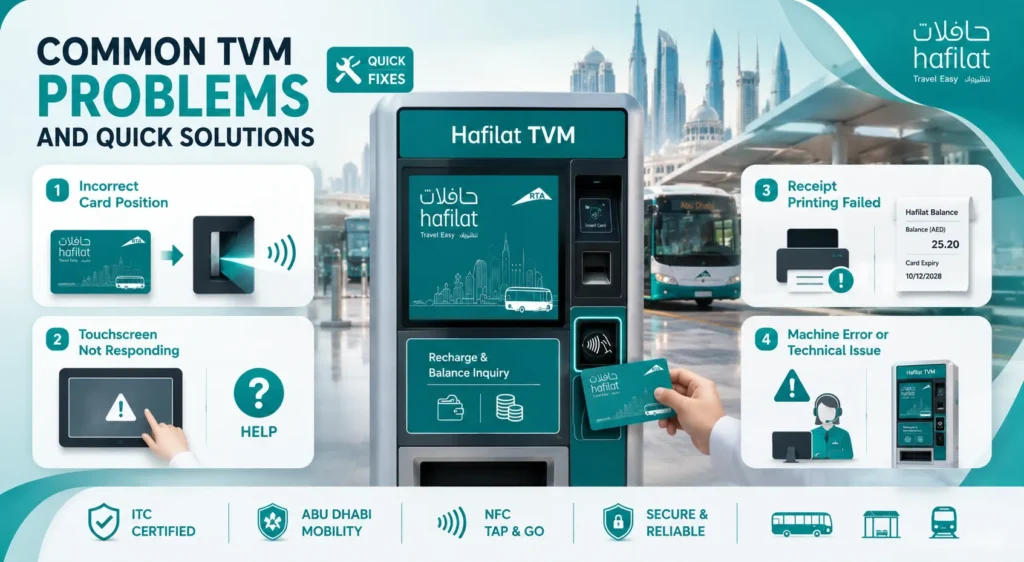
Incorrect Card Position
If the machine cannot detect your card, reinsert it using the correct chip or NFC orientation.
Touchscreen Not Responding
Press the Help button or use another nearby Hafilat vending machine.
Receipt Printing Failed
If no receipt is printed, manually note your Hafilat balance from the display screen.
Machine Error or Technical Issue
Visit the nearest customer service desk or try another ITC-certified TVM machine.
Why Use TVM Machines for Hafilat Balance Check?
Hafilat Ticket Vending Machines offer one of the fastest offline methods for checking Hafilat card balance in Abu Dhabi. They are reliable, easy to use, and ideal for passengers who:
- Do not have internet access
- Prefer offline Hafilat balance inquiry methods
- Need immediate balance information before travel
- Want to recharge Hafilat cards instantly
- Use the intercity Abu Dhabi bus services regularly
TVM machines help commuters avoid low-balance interruptions and make public transport travel across Abu Dhabi more convenient and efficient.
Hafilat Balance Check Using Bus Recharge Machines
Passengers traveling on Abu Dhabi intercity bus routes can also perform a quick Hafilat balance check using onboard bus recharge devices and NFC card readers. These smart transport machines are installed inside buses and provide an easy offline method to check the Hafilat card balance while traveling.
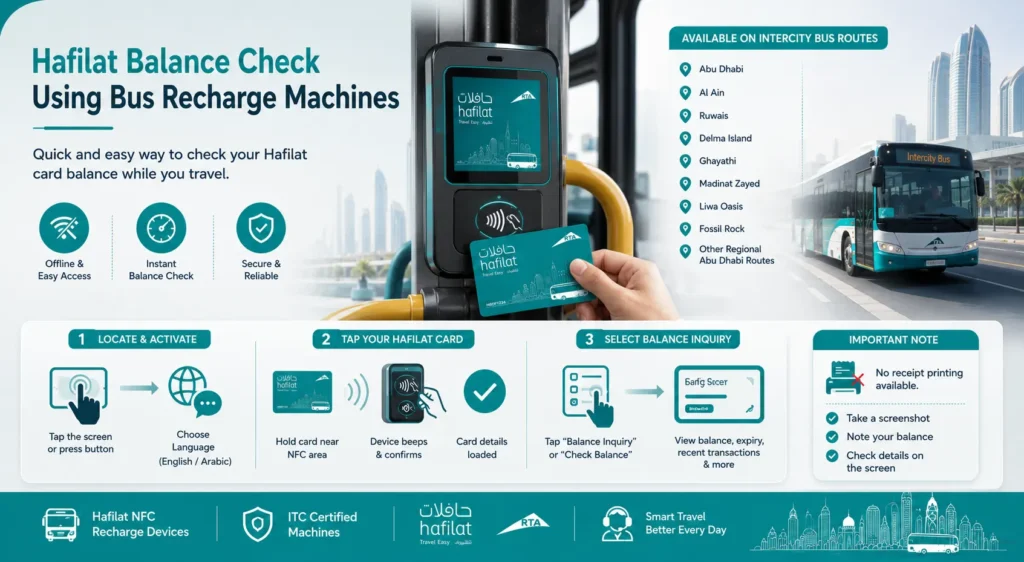
This option is especially useful for commuters traveling between Abu Dhabi and outer regions where internet access may not always be stable.
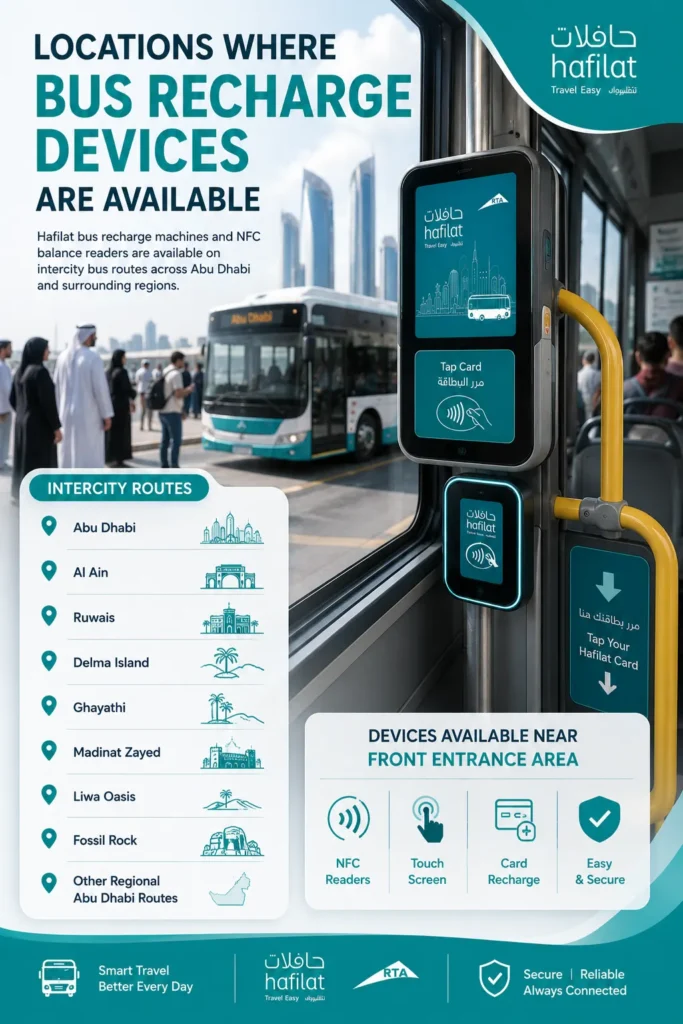
Locations Where Bus Recharge Devices Are Available
Hafilat bus recharge machines and NFC balance readers are commonly available on intercity bus routes operating between:
- Abu Dhabi
- Al Ain
- Ruwais
- Delma Island
- Ghayathi
- Madinat Zayed
- Liwa Oasis
- Fossil Rock
- Other regional Abu Dhabi transport routes
These devices are usually installed near the front entrance area of the bus for quick passenger access.
Step 1: Locate and Activate the Recharge Device
Find the Hafilat recharge machine or NFC reader inside the bus. Most devices include touchscreen controls and Hafilat branding.
To activate the device:
- Tap the screen or press the displayed button
- Wait for the menu to appear
- Select your preferred language:
- English
- Arabic
Choosing the correct language makes the Hafilat balance inquiry process faster and easier during travel.
Step 2: Tap Your Hafilat Card
Hold your Hafilat card close to the NFC contactless reader area marked with the Hafilat logo.
The machine will scan your card automatically.
After a few seconds:
- The device may beep
- A confirmation message will appear
- Your card details will load on the screen
Make sure to keep the card steady until the reader successfully detects it.
Step 3: Select “Balance Inquiry”
From the main menu, tap:
- Balance Inquiry
- Check Hafilat Balance
- Card Information
The onboard recharge machine will instantly display your Hafilat card details and available transport balance.
Passengers can usually view:
- Current Hafilat balance in AED
- Card expiry date
- Recent travel transactions
- Last recharge activity
- Card status information
This allows travelers to monitor their public transport balance before continuing their journey.
Important Note About Bus Recharge Devices
Unlike Ticket Vending Machines (TVMs), onboard bus recharge devices usually do not support receipt printing.
For convenience, you can:
- Take a screenshot of the balance screen
- Note your available balance manually
- Check transaction details directly on the device display
These Hafilat NFC recharge machines provide a fast and convenient offline Hafilat balance check solution for Abu Dhabi intercity bus passengers without needing mobile apps or internet access.
Hafilat Balance Check Through Customer Service Centers
Passengers who prefer in-person assistance can easily perform a Hafilat balance check through official customer support centers and Hafilat service counters across Abu Dhabi. This offline method is ideal for users who need help with balance inquiries, card verification, recharge issues, or transport card support.
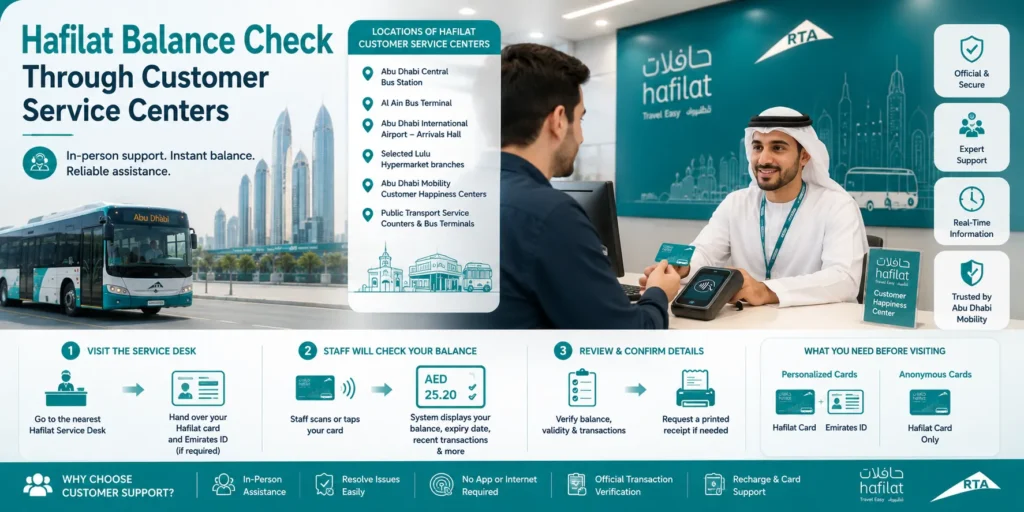
Customer service representatives can instantly check your Hafilat card balance, review recent travel transactions, and assist with card-related problems using official Abu Dhabi Mobility systems.
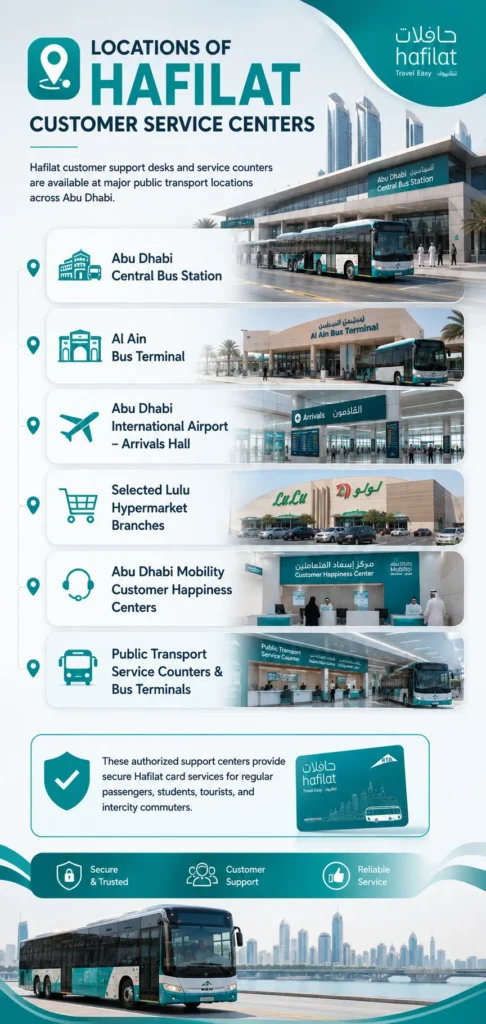
Locations of Hafilat Customer Service Centers
Hafilat customer support desks and service counters are commonly available at major public transport locations, including:
- Abu Dhabi Central Bus Station
- Al Ain Bus Terminal
- Abu Dhabi International Airport – Arrivals Hall
- Selected Lulu Hypermarket branches
- Abu Dhabi Mobility customer happiness centers
- Public transport service counters and bus terminals
These authorized support centers provide secure Hafilat card services for regular passengers, students, tourists, and intercity commuters.
What You Need Before Visiting
Before requesting a Hafilat balance inquiry, make sure you carry the required documents:
For Personalized Hafilat Cards
Bring:
- Your physical Hafilat card
- Emirates ID for identity verification
For Anonymous Hafilat Cards
Bring:
- Only the physical Hafilat card
Anonymous cards are not linked to personal identification details, so Emirates ID verification is usually not required.
Step 1: Visit the Hafilat Service Desk
Go to the nearest:
- Hafilat customer service counter
- Customer happiness center
- Public transport support desk
Inform the staff that you want to perform a Hafilat card balance check or Hafilat balance inquiry.
If requested, hand over your:
- Hafilat card
- Emirates ID (for personalized cards)
Step 2: Staff Will Check Your Hafilat Balance
The customer support representative will scan or tap your Hafilat card using the official terminal device connected to the Abu Dhabi transport system.
Within a few seconds, the system will display your:
- Current Hafilat balance in AED
- Card expiry date
- Recent recharge history
- Latest travel transactions
- Card status details
This method provides accurate and real-time Hafilat balance information directly from the official transport database.
Step 3: Review and Confirm Your Card Details
Carefully verify the information displayed on the screen, including:
- Available transport balance
- Card validity period
- Recent bus trips and fare deductions
If needed, you can also request:
- A printed balance receipt
- Recharge assistance
- Card troubleshooting support
Before leaving the counter, make sure to collect your:
- Hafilat card
- Emirates ID
- Printed receipt (if requested)
Why Use Customer Support for Hafilat Balance Check?
Checking Hafilat balance through customer service centers is useful for passengers who:
For convenience, you can:
- Need in-person assistance
- Face issues with online balance inquiry
- Cannot access the Darb app
- Want official transaction verification
- Need help with card recharge or card activation
Official Hafilat support centers provide reliable assistance and secure access to Abu Dhabi public transport card services for all commuters.
Hafilat Balance Check at Retail Partner Outlets
Passengers can also perform a Hafilat balance check through authorized retail partner outlets across Abu Dhabi. These approved service locations provide convenient offline access to Hafilat card services without visiting a main transport center or using the Darb app.
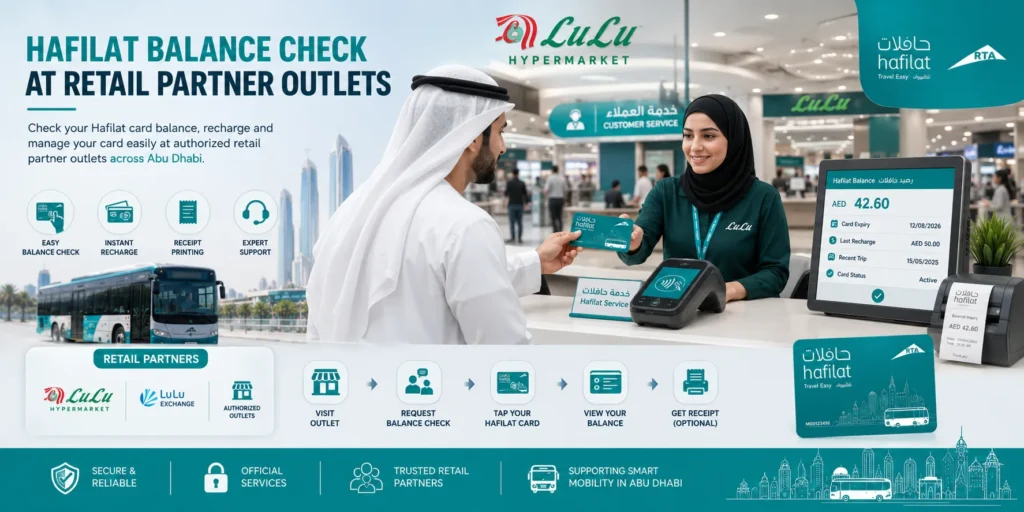
Popular retail partners such as LuLu Hypermarket branches, LuLu Exchange outlets, and selected public service stores allow users to check Hafilat card balance, recharge transport credit, and manage public transport cards during everyday activities like shopping, bill payments, or currency exchange.
This method is ideal for commuters who prefer face-to-face assistance while handling daily errands.
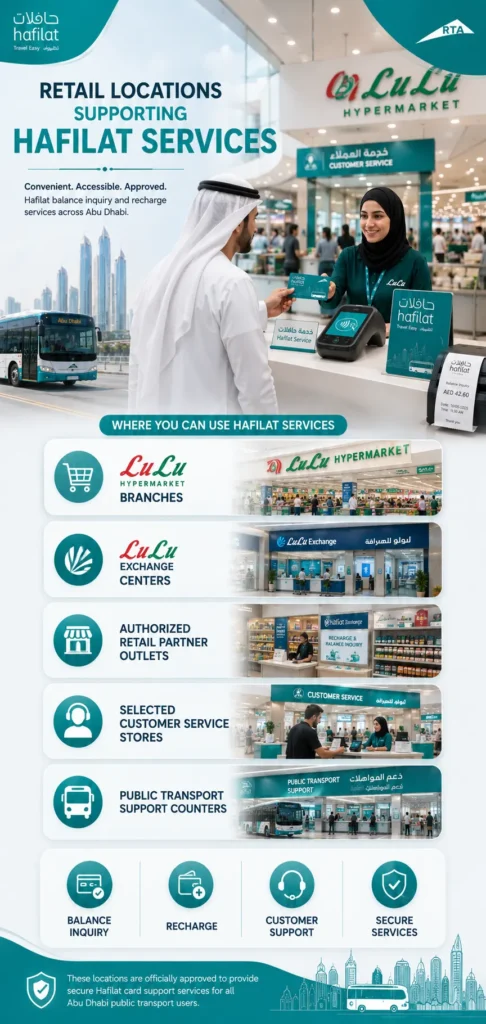
Retail Locations Supporting Hafilat Services
Hafilat balance inquiry and recharge services are commonly available at:
- LuLu Hypermarket branches
- LuLu Exchange centers
- Authorized retail partner outlets
- Selected customer service stores
- Public transport support counters
These locations are officially approved to provide secure Hafilat card support services for Abu Dhabi public transport users.
Step 1: Visit a Participating Retail Outlet
Go to any authorized Hafilat retail partner location near you.
Inside the store, look for:
- Hafilat Service Counter
- Customer Service Desk
- Recharge & Balance Inquiry Counter
Many LuLu branches and exchange centers display Hafilat service signs near payment or customer assistance areas.
Step 2: Request a Hafilat Balance Inquiry
Speak with the service representative and inform them that you want to perform a:
- Hafilat balance check
- Hafilat card balance inquiry
- Hafilat recharge inquiry
The staff member will guide you through the process and prepare the balance checking terminal.
Step 3: Provide Your Hafilat Card
Hand over your physical Hafilat card to the service representative.
In some cases, personalized cardholders may also be asked to provide basic identification details for verification purposes.
The representative will then scan or tap your card using the authorized Hafilat terminal system.
Step 4: View Your Hafilat Card Balance
Within a few seconds, your Hafilat card details will appear on the screen.
You can usually view:
- Current Hafilat balance in AED
- Card expiry date
- Recharge history
- Recent transactions
- Card status information
This provides passengers with accurate and real-time balance details directly from the official Abu Dhabi transport system.
Step 5: Request a Printed Receipt (Optional)
If needed, you can ask the staff member to provide a printed receipt containing your:
- Available balance
- Transaction details
- Recharge information
- Date and time of inquiry
Keeping a receipt can be useful for travel planning, reimbursement records, or monitoring public transport spending.
Why Use Retail Partner Outlets for Hafilat Balance Check?
Checking Hafilat balance at retail partner outlets is a convenient option for passengers who:
- Prefer offline Hafilat balance inquiry methods
- Do not use the Darb mobile app
- Need quick balance information while shopping
- Want assistance from service staff
- Need recharge and balance services in one place
Authorized retail outlets make Hafilat card management easier and more accessible for Abu Dhabi commuters, students, tourists, and daily bus passengers.
Hafilat Fine Check Online
Hafilat is Abu Dhabi’s official smart transport card system used for public buses and intercity travel. In addition to managing transport payments, the system records public transport violations and fines linked to Hafilat cards.
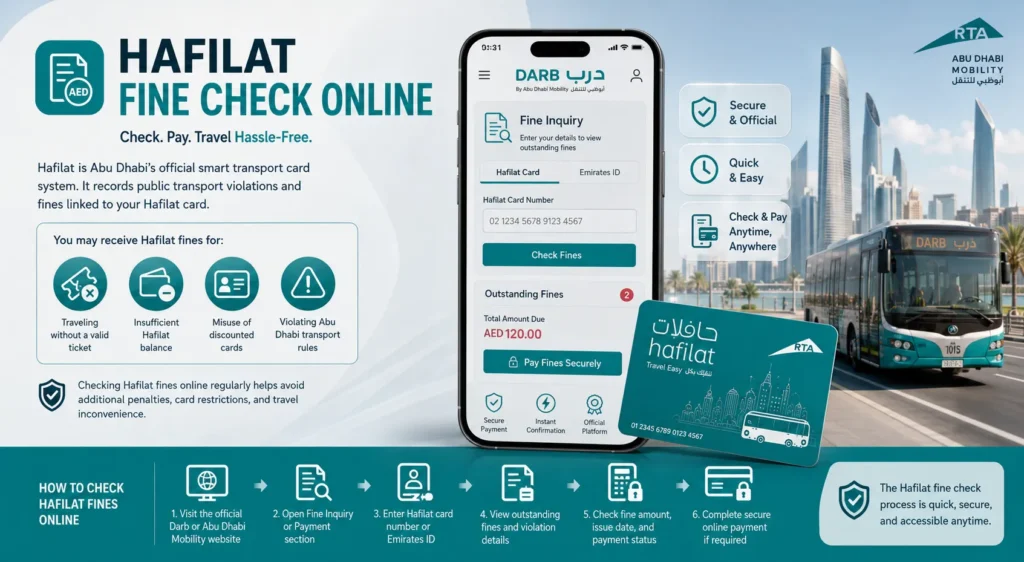
Passengers may receive Hafilat fines for reasons such as:
- Traveling without a valid ticket
- Insufficient Hafilat balance
- Misuse of discounted cards
- Violating Abu Dhabi transport rules
Checking Hafilat fines online regularly helps avoid additional penalties, card restrictions, and travel inconvenience.
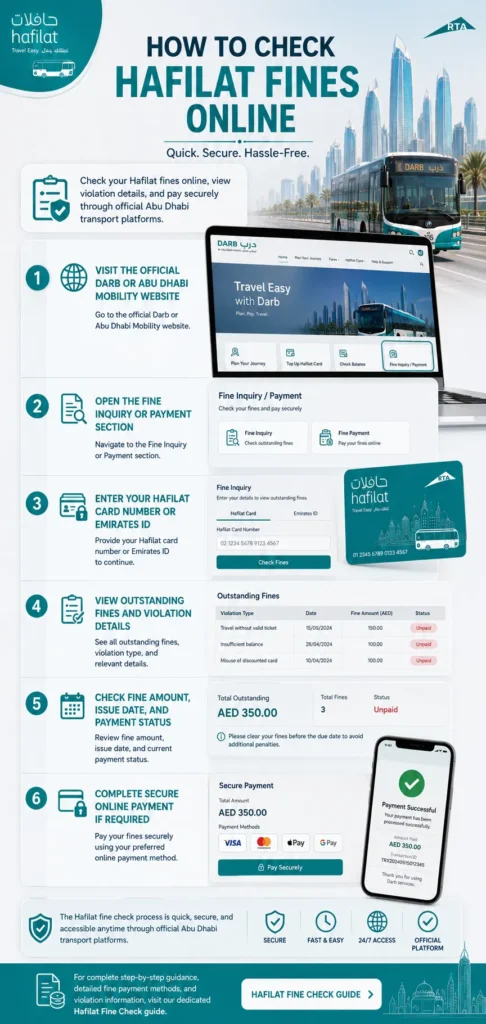
How to Check Hafilat Fines Online
You can easily perform a Hafilat fine inquiry by following these steps:
- Visit the official Darb or Abu Dhabi Mobility website
- Open the Fine Inquiry or Payment section
- Enter your Hafilat card number or Emirates ID
- View outstanding fines and violation details
- Check fine amount, issue date, and payment status
- Complete secure online payment if required
The Hafilat fine check process is quick, secure, and accessible anytime through official Abu Dhabi transport platforms.
For complete step-by-step guidance, detailed fine payment methods, and violation information, visit our dedicated Hafilat Fine Check guide.
Hafilat Recharge Online
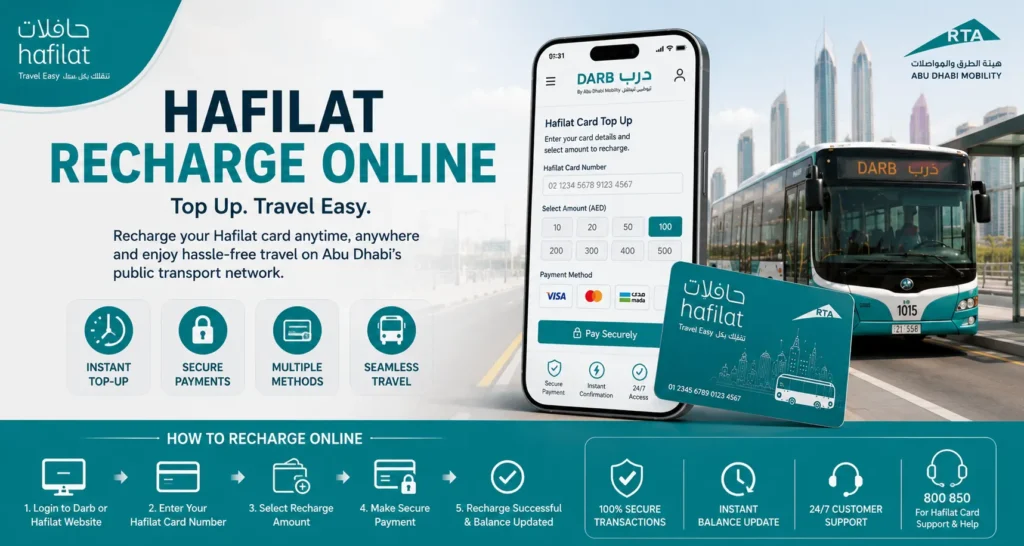
Hafilat recharge allows Abu Dhabi public transport users to add balance to their Hafilat card for uninterrupted travel across buses and intercity transport routes. Keeping a sufficient balance on your card ensures smooth, cashless, and hassle-free commuting throughout the Abu Dhabi public transport network.
Steps To Check Hafilat Balance Online
Step 1: Open the Official Hafilat Recharge Portal
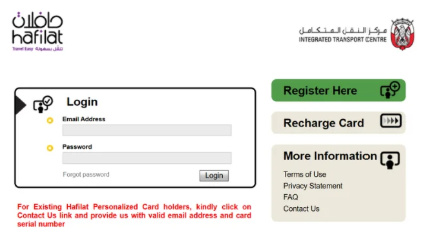
Start by visiting the official Hafilat online recharge portal using your preferred web browser. To protect your card details and payment information, always use the official website provided by the Integrated Transport Centre (ITC).
Official Hafilat Recharge Portal: https://hafilat.darb.ae/AnonymousMedia/Default.aspx
Step 2: Sign In to Your Hafilat Account
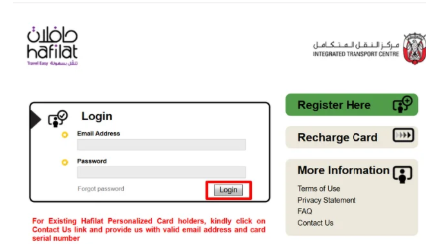
Log in using your registered username and password to access Hafilat online services. After signing in, you’ll be able to manage your card, check your balance, and recharge your Hafilat Card securely.
If you don’t have an account yet, select the Register option on the login page and create a new account by following the on-screen instructions. Once your registration is complete, sign in to continue with the recharge process.
Step 3: Select Recharge Card
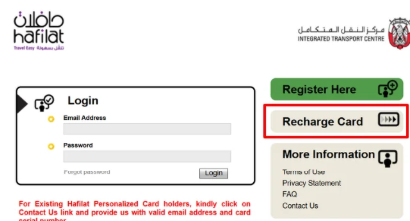
After you sign in successfully, you’ll be taken to your Hafilat account dashboard. Locate and click the Recharge Card option to begin adding credit to your Hafilat Card.
This option opens the online recharge page, where you can choose your card, enter the recharge amount, and continue to the payment step. If you’re having trouble finding it, look for the Recharge Card menu on your dashboard, as shown in the illustration below.
Step 4: Enter Your Hafilat Card Serial Number
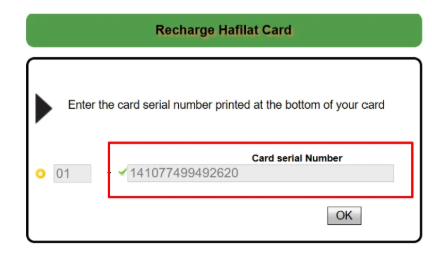
On the recharge page, enter your Hafilat Card serial number exactly as it appears on the back of your card. Double-check the number to avoid errors that could delay the recharge process.
After verifying the card serial number, click the OK button to retrieve your card details and continue to the next step.
Step 5: Choose a Recharge Amount
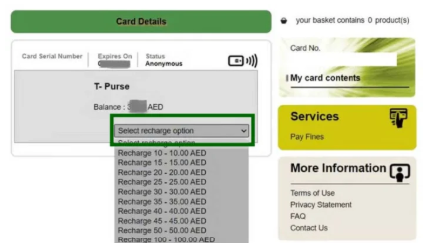
Next, select the amount you want to add to your Hafilat Card. The recharge page offers several predefined options, making it easy to choose the amount that matches your travel needs.
Depending on the available options, you can select a value such as AED 20, AED 50, AED 100, or another supported recharge amount. After choosing your preferred amount, continue to the payment step to complete the transaction.
Step 6: Complete the Payment
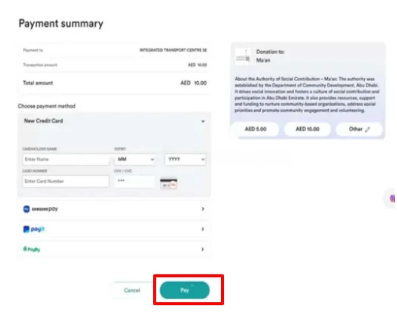
Choose your preferred payment method from the available options on the checkout page. Depending on the official Hafilat portal, you may be able to pay using a credit card, debit card, Apple Pay, Google Pay, or other supported payment methods.
If you’re paying by card, enter the required payment details, such as your cardholder name, card number, expiry date, and CVV/security code. Review the information carefully, then click Pay to complete the transaction.
Once your payment is successful, you’ll receive a confirmation message. Keep the confirmation or payment receipt for your records until the recharge is reflected on your Hafilat Card.
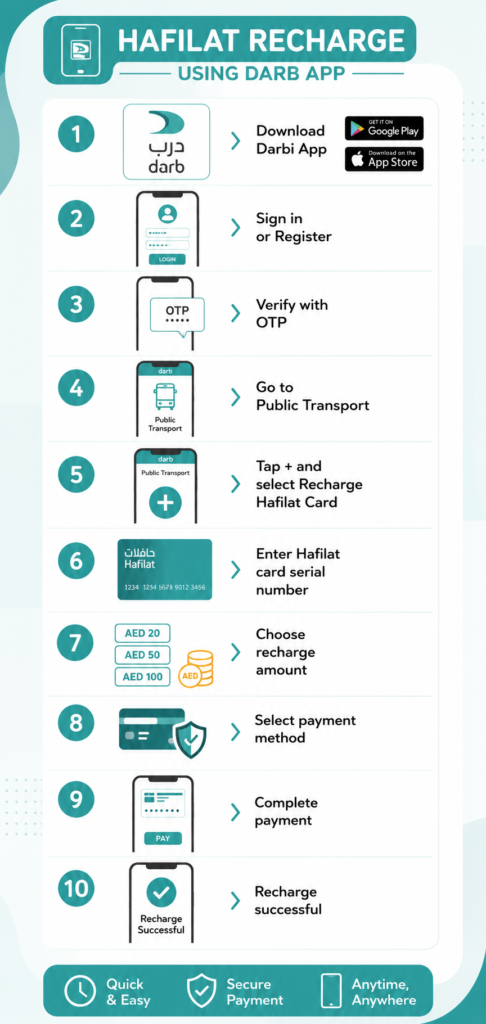
Hafilat Recharge Using the Darbi App
The Darbi App allows you to recharge your Hafilat Card quickly from your smartphone without visiting a ticket office or recharge center. It also provides access to various public transport services, making it a convenient option for managing your Hafilat Card while you’re on the go.
Steps to Recharge Your Hafilat Card Using the Darbi App
- Download the Darbi App: Install the official Darbi App from the Google Play Store (Android) or the Apple App Store (iPhone).
- Sign In or Register: Open the app and log in with your existing account. If you’re a new user, create an account by completing the registration process.
- Verify Your Account: Enter the One-Time Password (OTP) sent to your registered mobile number, if verification is required.
- Open the Public Transport Section: From the app’s home screen, navigate to the Public Transport section to access Hafilat services.
- Select “Recharge Hafilat Card”: Tap the Plus (+) icon or choose the Recharge Hafilat Card option to begin the recharge process.
- Enter Your Card Serial Number: Carefully type your Hafilat Card serial number exactly as it appears on the back of your card, then verify it before proceeding.
- Choose the Recharge Amount: Select your preferred recharge value from the available options based on your travel requirements.
- Select a Payment Method: Choose a supported payment option, such as a credit card or debit card, and enter the required payment details.
- Confirm the Payment: Review your information and tap Pay to complete the transaction securely.
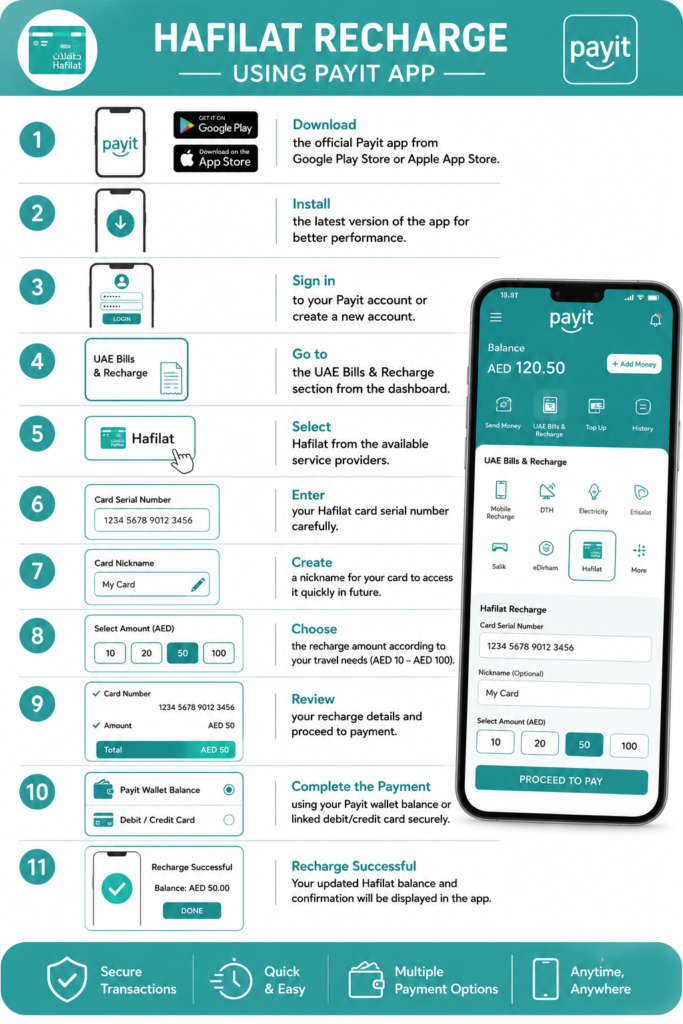
Hafilat Recharge Using the Payit App
The Payit App provides another convenient way to recharge your Hafilat Card without visiting a ticket office or vending machine. You can add travel credit, manage your payments, and complete the entire recharge process securely from your smartphone.
Steps to Recharge Your Hafilat Card Using the Payit App
- Download the Payit App: Install the official Payit Mobile Wallet app from the Google Play Store or the Apple App Store.
- Update to the Latest Version: Make sure you’re using the latest version of the app to access the newest features, security improvements, and transport services.
- Sign In to Your Account: Open the app and log in with your existing Payit account. If you don’t have one, complete the registration process to create a new account.
- Open the Bills & Recharge Section: From the home screen, navigate to the UAE Bills & Recharge section to access available payment services.
- Choose Hafilat: Select Hafilat from the list of supported service providers.
- Enter Your Card Serial Number: Carefully type your Hafilat Card serial number exactly as it appears on the back of your card.
- Add a Card Nickname (Optional): Assign a nickname to your Hafilat Card, such as Personal, Work, or Student, to identify it easily during future recharges.
- Select the Recharge Amount: Choose the amount you want to add to your card from the available recharge options.
- Review Your Details: Verify your card number, recharge amount, and payment information before continuing.
- Complete the Payment: Pay securely using your Payit Wallet balance or a linked debit or credit card, then confirm the transaction.
- Receive Confirmation: Once the payment is successful, the app will display a recharge confirmation. Your updated Hafilat Card balance may appear immediately or after the recharge has been synchronized with the transport system. Keeping a copy of the payment receipt is recommended for future reference.
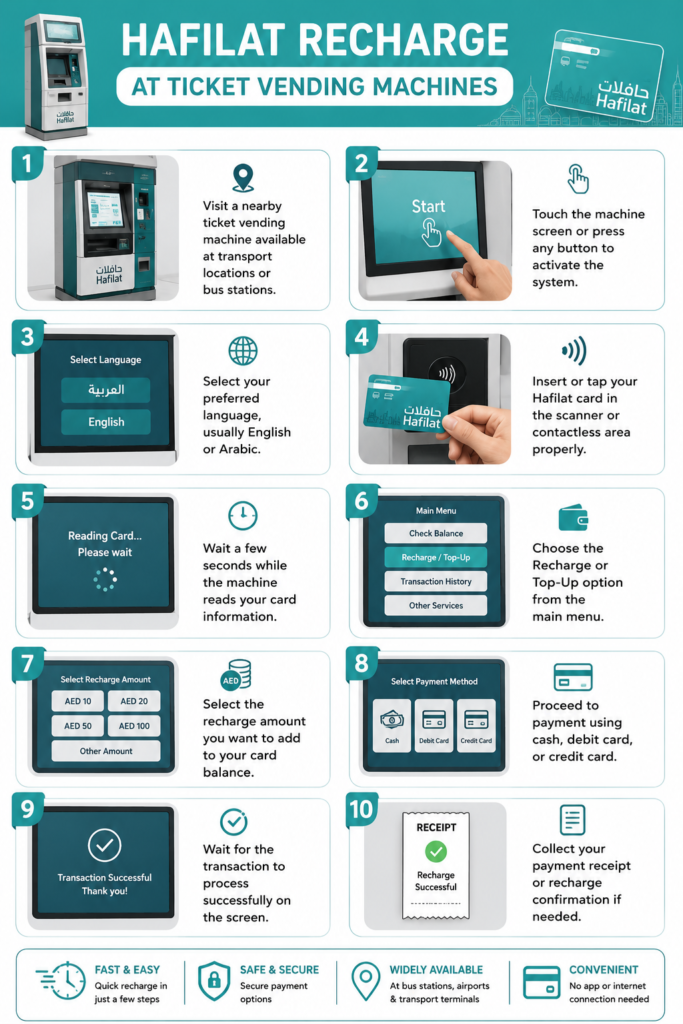
Hafilat Recharge at Ticket Vending Machines
Ticket vending machines offer a quick and convenient way to recharge your Hafilat Card while you’re at a bus station or transport hub. These self-service kiosks are available at many locations across Abu Dhabi, allowing passengers to top up their cards, check their balance, and complete transactions without using a mobile app or visiting a customer service center.
Steps to Recharge Your Hafilat Card at a Ticket Vending Machine
- Visit a Ticket Vending Machine: Go to the nearest Hafilat ticket vending machine located at a bus station, transport terminal, or another designated public location.
- Activate the Machine: Tap the touchscreen or press any button if prompted to start the service.
- Choose Your Preferred Language: Select English or Arabic from the language options displayed on the screen.
- Scan Your Hafilat Card: Place or tap your Hafilat Card on the card reader or contactless scanning area until the machine recognizes it.
- Wait for Card Verification: Allow a few seconds for the machine to read your card details and display the available options.
- Select the Recharge Option: Tap Recharge or Top-Up from the main menu to continue.
- Choose the Recharge Amount: Select the amount you want to add to your Hafilat Card from the available recharge values.
- Complete the Payment: Pay using one of the supported payment methods, such as cash, debit card, or credit card, depending on the machine’s available options.
- Wait for Confirmation: Remain at the machine until the transaction is processed and a successful recharge message appears on the screen.
- Collect Your Receipt: If the machine prints a receipt, keep it as proof of payment until the updated balance is reflected on your Hafilat Card.
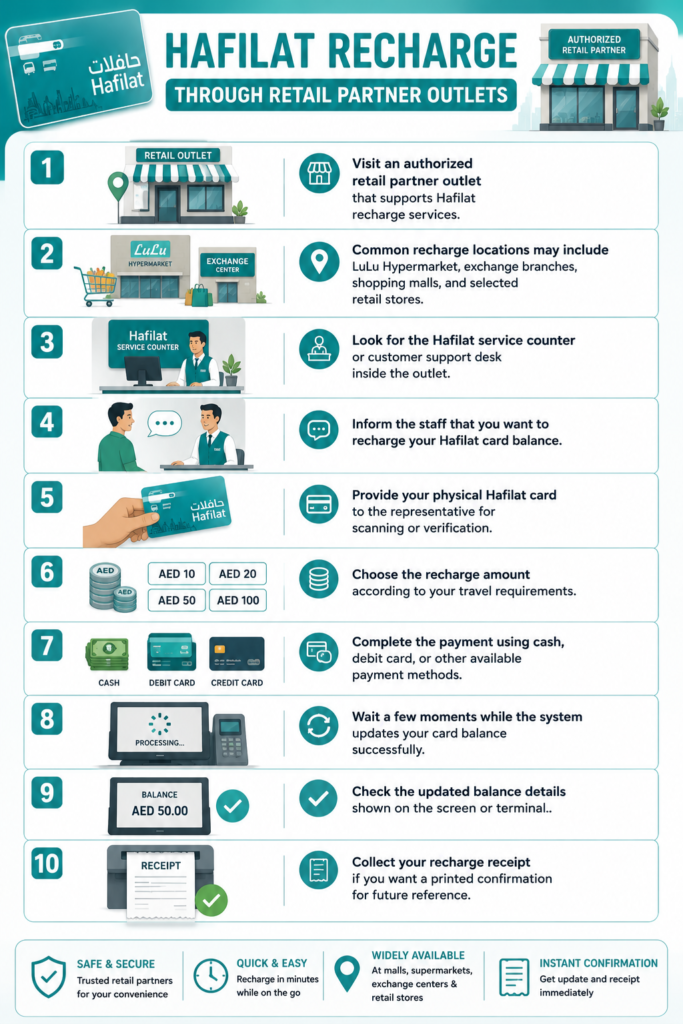
Hafilat Recharge Through Retail Partner Outlets
Authorized retail partner outlets provide a convenient way to recharge your Hafilat Card while you’re shopping or running daily errands. Many supermarkets, exchange centers, and approved retail stores across Abu Dhabi offer Hafilat recharge services, making it easy to top up your card without visiting a bus station or ticket vending machine.
Steps to Recharge Your Hafilat Card at a Retail Partner Outlet
- Visit an Authorized Retail Outlet: Go to a retail partner that offers official Hafilat Card recharge services.
- Locate the Service Counter: Find the customer service desk or Hafilat recharge counter inside the store.
- Request a Hafilat Recharge: Let the staff know that you would like to add credit to your Hafilat Card.
- Provide Your Hafilat Card: Hand your physical Hafilat Card to the representative so they can scan or verify the card details.
- Choose the Recharge Amount: Select the amount you want to add based on your travel needs.
- Make the Payment: Complete the transaction using one of the available payment methods, such as cash, debit card, or credit card, depending on the outlet’s accepted payment options.
- Wait for the Recharge to Process: The representative will process your payment and update your Hafilat Card balance through the official system.
- Verify Your Updated Balance: Check the balance displayed on the terminal or ask the staff to confirm that the recharge has been applied successfully.
- Collect Your Receipt: Take the printed receipt or payment confirmation and keep it until your updated balance is reflected on your Hafilat Card.
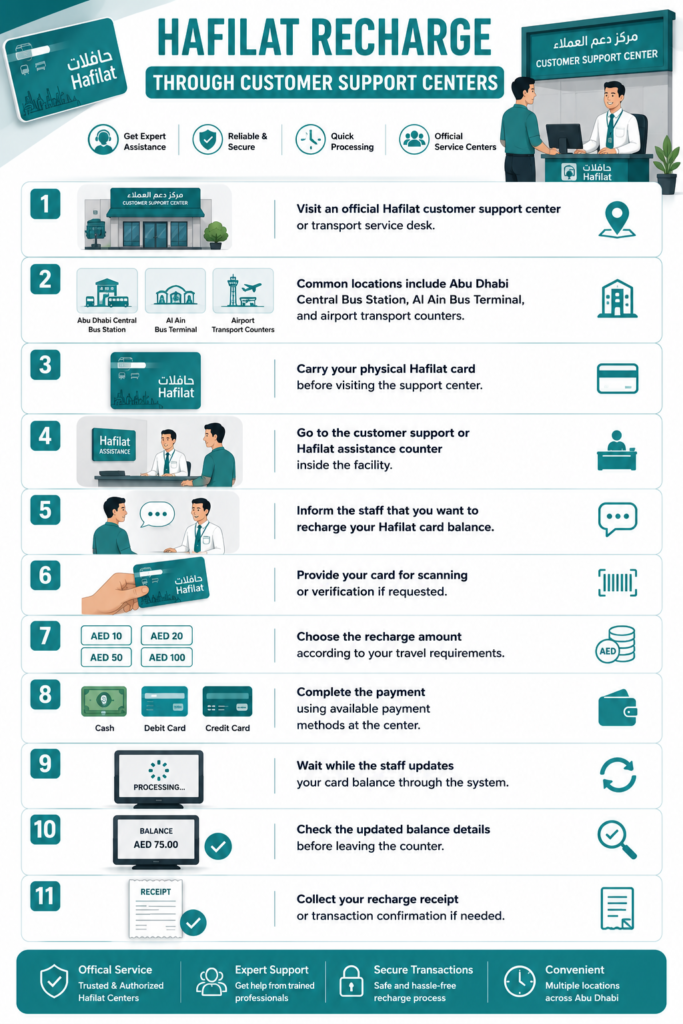
Hafilat Recharge Through Customer Support Centers
Official Hafilat Customer Support Centers are the best option if you need assistance with recharging your card or resolving card-related issues. Trained staff can help with balance inquiries, recharge requests, damaged or blocked cards, transaction issues, and support for personalized Hafilat Cards.
Steps to Recharge Your Hafilat Card at a Customer Support Center
- Visit an Official Customer Support Center: Go to an authorized Hafilat Customer Support Center or public transport service desk in Abu Dhabi.
- Bring Your Hafilat Card: Carry your physical Hafilat Card so it can be scanned or verified during the recharge process.
- Go to the Hafilat Service Counter: Locate the customer service or Hafilat assistance desk inside the transport center.
- Request a Card Recharge: Inform the customer service representative that you would like to recharge your Hafilat Card.
- Provide Your Card for Verification: Hand your Hafilat Card to the staff if they need to scan or verify your card details.
- Choose the Recharge Amount: Select the amount you want to add based on your travel requirements.
- Complete the Payment: Pay using one of the accepted payment methods available at the service center, such as cash, debit card, or credit card.
- Wait for the Recharge to Be Processed: The staff will process your payment and update your Hafilat Card balance through the official system.
- Verify Your Updated Balance: Before leaving the counter, confirm that the recharge has been applied successfully and check your updated card balance.
- Collect Your Receipt: Take the payment receipt or transaction confirmation and keep it for your records until the recharge is successfully reflected on your Hafilat Card.
Recharge Method Comparison
Recharge Method | Available Anytime | Requires Internet | Payment Method | Best For |
|---|---|---|---|---|
Official Website | Yes | Yes | Electronic Payment | Home or Office |
Mobile App | Yes | Yes | Electronic Payment | Everyday Use |
Ticket Vending Machine | During Station Hours | No | Supported On-site Payments | Before Boarding |
Customer Service Center | Business Hours | No | Supported Payments | Personal Assistance |
Authorized Retailer | Store Hours | No | Supported Payments | Local Convenience |
Safety Tips During Recharge
Whether you recharge online or at a physical location, following a few simple precautions helps protect your account.
- Use official Hafilat services whenever possible.
- Double-check your card details before payment.
- Avoid sharing your card information with unknown websites.
- Keep your payment receipt until the recharge is confirmed.
- Contact official customer support if you notice unexpected transaction issues.
Common Reasons a Recharge May Not Appear Immediately
Although many transactions are processed quickly, there are situations where the updated balance may not appear right away.
Possible reasons include:
- Temporary network synchronization
- Payment still being processed
- Card activation requirements after an online recharge
- Temporary service maintenance
If your balance does not update after completing all required steps, verify the payment confirmation and contact the official customer support team for assistance.
Best Practices for Regular Bus Passengers
If you rely on Abu Dhabi public buses for work, education, or daily travel, maintaining your Hafilat Card becomes much easier with a few simple habits.
- Check your balance regularly.
- Recharge before your balance becomes too low.
- Save digital payment receipts.
- Register your card if eligible.
- Use official recharge channels only.
- Keep your contact information updated for personalized accounts.
Building these habits helps reduce travel disruptions and makes every journey across Abu Dhabi’s public transport network smoother and more predictable.
Types of Hafilat Cards in Abu Dhabi
Abu Dhabi Mobility offers multiple types of Hafilat cards designed for residents, students, tourists, senior citizens, and daily public transport passengers. Each Hafilat smart card provides different travel benefits, fare options, and eligibility requirements depending on the user category.
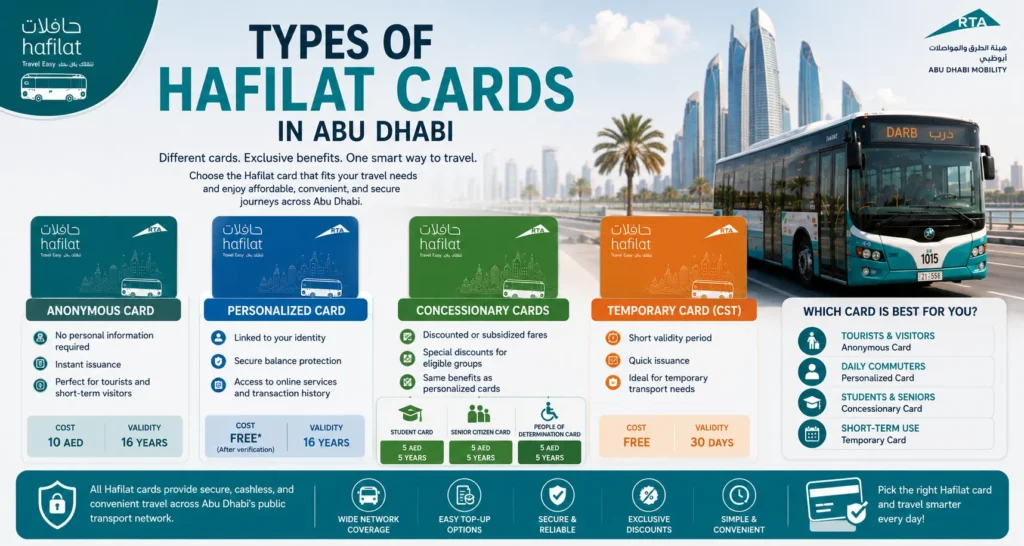
Choosing the correct Hafilat card helps passengers access affordable fares, secure balance protection, and convenient travel across Abu Dhabi bus routes and intercity transport services.
Anonymous Hafilat Card
The Anonymous Hafilat Card is ideal for tourists, short-term visitors, and passengers who prefer privacy.
Key Features:
- No personal information required
- Instant issuance at ticket vending machines and service centers
- Suitable for temporary public transport use
- Easy balance recharge and offline usage
Card Cost & Validity:
- Price: 10 AED
- Validity: 16 Years
This card is commonly used for quick travel access without account registration.
Personalized Hafilat Card
The Personalized Hafilat Card is designed for regular commuters and long-term Abu Dhabi residents.
Key Benefits:
- Linked to passenger identity for added security
- Supports online balance recovery and card protection
- Compatible with Darb App and Hafilat online portal
- Access to transaction history and digital services
Card Cost & Validity:
- Price: Free (after document verification)
- Validity: 16 Years
This option is recommended for daily public transport users who want secure and reliable Hafilat services.
Concessionary Hafilat Cards
Concession Hafilat cards provide discounted or subsidized fares for eligible passenger groups in Abu Dhabi public transport.
Available Concession Card Categories:
- Student Hafilat Card
- Senior Citizen Hafilat Card
- People of Determination / Special Needs Card
Main Benefits:
- Reduced public transport fares
- Special travel discounts
- Long-term travel convenience
- Personalized card protection features
Card Costs & Validity
Card Type | Cost | Validity |
|---|---|---|
Student Card | 5 AED | 5 Years |
Senior Citizen Card | 5 AED | 5 Years |
People of Determination Card | 5 AED | 5 Years |
Applicants may need supporting documents to verify eligibility before approval.
Temporary Hafilat Card (CST)
The Temporary Hafilat Card is intended for short-term public transport access and limited travel periods.
Features:
- Short validity period
- Quick issuance process
- Useful for temporary transport requirements
Card Cost & Validity:
- Price: Free
- Validity: 30 Days
This card is often used for temporary transport arrangements or special travel situations.
Hafilat Card Types Overview
Hafilat Card Type | Eligibility | Main Benefits | Best For | Cost | Validity |
|---|---|---|---|---|---|
Anonymous Hafilat Card | Tourists, visitors, general passengers | Instant issuance, no ID required, easy recharge | Short-term travel & privacy-focused users | 10 AED | 16 Years |
Personalized Hafilat Card | Abu Dhabi residents & daily commuters | Secure balance recovery, linked account, online services | Long-term regular public transport users | Free | 16 Years |
Student Hafilat Card | Students with valid documents | Discounted public transport fares | School & university students | 5 AED | 5 Years |
Senior Citizen Hafilat Card | Senior citizens | Subsidized or discounted transport fares | Elderly passengers | 5 AED | 5 Years |
People of Determination Card | Special needs / disabled passengers | Special transport discounts & support services | Eligible passengers with disability support | 5 AED | 5 Years |
Temporary Hafilat Card (CST) | Temporary travelers & short-term users | Short-duration transport access | Temporary transport use | Free | 30 Days |
Which Hafilat Card Is Best?
The best Hafilat card depends on your travel needs:
- Tourists & Visitors: Anonymous Card
- Daily Commuters: Personalized Card
- Students & Seniors: Concessionary Card
- Short-Term Use: Temporary Card
Selecting the right Hafilat smart card helps passengers save money, access transport discounts, and manage Abu Dhabi public transport services more efficiently.
Bus Fares
The Hafilat Card uses an electronic fare collection system for Abu Dhabi’s public bus network. Every time you travel, the fare is deducted automatically from your available card balance after your trip is recorded by the system. This eliminates the need to carry cash and makes boarding quicker and more convenient.
The exact fare depends on several factors, including your journey, travel distance, and the fare policies set by the Integrated Transport Centre (ITC). Since transport fares may change over time, passengers should always refer to the official Hafilat or Darbi platforms for the latest fare information.
How Bus Fares Are Calculated
When you use your Hafilat Card, the system automatically calculates the correct fare based on your journey. To ensure accurate fare deduction, always tap your card as instructed when boarding and, where required, when exiting the bus.
Several factors may affect the fare, including:
- Distance traveled
- Bus route
- Type of service
- Applicable travel concessions
- Current transport fare policy
Hafilat Fare Payment Process
Using your Hafilat Card is straightforward:
- Recharge your card before traveling.
- Board the bus and tap your card on the validator.
- Complete your journey.
- Tap again if required.
- The fare is deducted automatically from your available balance.
Keeping sufficient credit on your card helps avoid interruptions during your journey.
Passenger Categories
Different passenger groups may qualify for different travel benefits depending on official transport policies.
These may include:
- Adults
- Students
- Senior citizens
- People of Determination
Eligibility requirements and available concessions are determined by the Integrated Transport Centre.
Tips for Managing Bus Fare Payments
To avoid travel disruptions:
- Check your Hafilat balance regularly.
- Recharge your card before the balance becomes too low.
- Keep your card in good condition.
- Use only official recharge channels.
- Save your recharge receipts until the balance is updated.
Where to Buy a Hafilat Card
Purchasing a Hafilat Card is simple, and several official locations across Abu Dhabi provide new cards for residents, visitors, and regular commuters.
Depending on the type of card you need, you can buy one from transport facilities or authorized sales locations.
Official Places to Buy a Hafilat Card
You can usually purchase a Hafilat Card from:
- Bus stations
- Main transport terminals
- Customer Support Centers
- Ticket vending machines (where available)
- Authorized retail partner outlets
- Selected transport service counters
Availability may vary depending on the card type and location.
Buying a Hafilat Card at a Bus Station
Major bus stations across Abu Dhabi provide Hafilat Cards through dedicated service counters.
The process generally includes:
- Visit the customer service desk.
- Request a new Hafilat Card.
- Choose the appropriate card type.
- Complete the payment.
- Receive your new card.
- Recharge the card before your first journey if necessary.
Buying Through Customer Support Centers
Customer Support Centers can also assist with:
- New Hafilat Card purchases
- Personalized card applications
- Card replacement
- Balance inquiries
- General transport assistance
Staff members can explain the available card types and help you select the one that best fits your travel needs.
Buying from Authorized Retail Partners
Some approved retail outlets also sell Hafilat Cards.
Depending on the location, you may be able to:
- Purchase a new card
- Recharge your existing card
- Check your balance
- Receive basic assistance
Always confirm that the outlet is an authorized Hafilat partner before making a purchase.
Choosing the Right Hafilat Card
Before purchasing, consider how often you use Abu Dhabi public buses. An occasional traveler may prefer an anonymous card, while daily commuters usually benefit from a personalized Hafilat Card that offers additional account management and replacement options.
Common Hafilat Card Errors
Although the Hafilat system is designed to operate smoothly, you may occasionally encounter errors while checking your balance, recharging your card, or traveling on public buses.
Most issues are easy to resolve once the cause has been identified.
Insufficient Balance
One of the most common problems occurs when there isn’t enough credit available on your card.
Possible causes:
- Balance too low
- Recent recharge not completed
- Multiple journeys reduced the available credit
Solution:
Check your balance using the official website, Darbi App, ticket vending machine, or another official method, then recharge your card before traveling again.
Recharge Not Showing
Sometimes a successful payment may not appear immediately on your card.
Possible causes:
- Recharge synchronization delay
- Temporary system processing
- Incomplete activation after an online recharge
Solution:
Wait a few minutes and follow any activation instructions provided after payment. If the balance still doesn’t update, contact official customer support with your payment confirmation.
Card Not Detected
A validator or ticket vending machine may occasionally fail to recognize your card.
Possible causes:
- Incorrect card placement
- Dirty card surface
- Damaged card
- Temporary reader issue
Solution:
Try scanning the card again and ensure it is placed correctly on the reader. If the issue continues, visit a Customer Support Center for assistance.
Payment Failed
A recharge payment may fail before it is completed.
Possible causes:
- Internet interruption
- Bank authorization issue
- Incorrect payment details
- Temporary payment gateway problem
Solution:
Verify your payment information and try again after a few minutes. If your bank confirms the payment but the recharge does not appear, contact official support before making another payment.
Card Expired
Some Hafilat Cards have a validity period.
If your card has expired, it may no longer be accepted for travel.
Solution:
Visit an official Customer Support Center to renew or replace the card according to the applicable transport policy.
Troubleshooting Hafilat Card Issues
Most Hafilat Card problems can be resolved by following a few simple troubleshooting steps before contacting customer support.
Your Balance Is Incorrect
If the displayed balance seems lower than expected:
- Refresh the balance using another official method.
- Check your recent transaction history.
- Confirm that previous journeys have been recorded correctly.
- Wait for any pending recharge to synchronize.
Online Recharge Failed
If your payment was unsuccessful:
- Check your internet connection.
- Verify your card details.
- Confirm your payment method is active.
- Try again later if the service is temporarily unavailable.
Avoid making repeated payments until you know the previous transaction was unsuccessful.
Card Reader Does Not Respond
If the bus validator or ticket machine does not detect your card:
- Remove the card and try again.
- Hold the card flat against the contactless reader.
- Avoid placing multiple contactless cards together.
- Use another validator if available.
Unable to Log In
If you cannot access your online account:
- Verify your username and password.
- Reset your password using the official recovery option.
- Check that your internet connection is working properly.
- Update the Darbi App if you’re using an older version.
When to Contact Customer Support
You should contact the official Hafilat Customer Support team if:
- Your recharge payment was successful but the balance never updates.
- Your card has been damaged or stopped working.
- Your card is lost or stolen.
- You notice unauthorized transactions.
- You need help replacing a personalized card.
- You experience repeated technical issues that cannot be resolved through the official website or mobile app.
Using only official Hafilat channels for balance checks, recharges, and customer support helps protect your account, ensures accurate transactions, and provides the fastest assistance whenever you need help with your card.
Lost Hafilat Card
Losing your Hafilat Card can be inconvenient, especially if you rely on Abu Dhabi’s public buses for daily travel. The steps you should take depend on whether your card is personalized or anonymous. Acting quickly can help protect your remaining balance and make the replacement process much easier.
What to Do If You Lose Your Hafilat Card
If your Hafilat Card is lost or misplaced, follow these steps as soon as possible:
- Check your belongings thoroughly to make sure the card is actually lost.
- If you have a personalized Hafilat Card, contact the official Hafilat Customer Support Center immediately.
- Inform the support representative that your card has been lost and request assistance.
- Follow the verification process to confirm your identity and card ownership.
- If eligible, request a replacement card according to the official replacement policy.
- Recharge your new card only after the replacement process has been completed.
Taking prompt action helps reduce the risk of unauthorized use if someone else finds your card.
Can You Recover the Remaining Balance?
In many cases, passengers with a personalized Hafilat Card may be able to recover the remaining balance, subject to the policies of the Integrated Transport Centre (ITC).
Whether the balance can be transferred depends on factors such as:
- Card type
- Registration status
- Account verification
- Official replacement policy
Anonymous cards may not provide the same level of protection because they are not linked to an individual account.
How to Replace a Lost Hafilat Card
If you qualify for a replacement, the general process includes:
- Visit an official Customer Support Center.
- Inform the staff that your Hafilat Card has been lost.
- Complete the required identity verification.
- Submit any documents requested by the support team.
- Pay the applicable replacement fee, if required.
- Receive your replacement Hafilat Card.
- Activate the new card according to the provided instructions.
The exact requirements may vary depending on your card type and the latest transport policies.
Tips to Prevent Losing Your Card
A few simple habits can help reduce the chance of losing your Hafilat Card:
- Keep your card in the same wallet or card holder.
- Avoid placing it loosely in your pocket or bag.
- Register your card whenever eligible.
- Store your card away from excessive heat or moisture.
- Keep your card number in a safe place for future reference.
Hafilat Card Validity
Every Hafilat Card has a validity period determined by the issuing transport authority. Checking your card’s validity before it expires helps prevent interruptions during your daily commute.
The validity period may differ depending on the type of Hafilat Card you use, such as an anonymous card, personalized card, student card, or concession card.
Why Card Validity Matters
An expired Hafilat Card may no longer be accepted by the fare collection system, even if it still contains a remaining balance.
Keeping your card valid helps you:
- Continue traveling without interruption.
- Avoid last-minute replacement requests.
- Maintain access to eligible travel benefits.
- Ensure your card works correctly on bus validators.
How to Check Your Card Validity
You can verify your card’s validity through official Hafilat service channels.
Available methods may include:
- Official Hafilat online portal
- Darbi App
- Customer Support Centers
- Ticket vending machines
- Transport service counters
If you are unsure whether your card is approaching its expiry date, a customer service representative can also assist you.
What to Do If Your Card Expires
If your Hafilat Card reaches its expiry date:
- Visit an official Customer Support Center.
- Ask the representative about renewal or replacement options.
- Complete any required verification process.
- Follow the instructions provided by the transport authority.
- Recharge your renewed or replacement card if necessary.
Keeping Your Card in Good Condition
Although every card has a validity period, proper care can help prevent physical damage that may affect its performance.
To protect your card:
- Avoid bending or folding it.
- Keep it away from magnets.
- Protect it from excessive heat.
- Do not scratch the chip or contactless surface.
- Store it in a protective card holder whenever possible.
Hafilat Customer Support
Official Customer Support Centers are available to assist passengers with a wide range of Hafilat Card services. Whether you need help with a recharge, balance inquiry, replacement card, or technical issue, trained representatives can provide guidance through the appropriate process.
Services Available Through Customer Support
Depending on your request, customer support can assist with:
- Hafilat Card recharge assistance
- Balance inquiries
- Card replacement
- Lost or damaged cards
- Transaction issues
- Personalized card services
- Account verification
- General public transport information
When Should You Contact Customer Support?
You should consider contacting customer support if:
- Your recharge payment was successful but your balance has not updated.
- Your card has been lost or stolen.
- Your card has stopped working.
- You cannot complete an online recharge.
- You notice an unexpected transaction.
- You need help applying for a personalized card.
- Your card has expired and requires renewal or replacement.
Information to Keep Ready
Before contacting customer support, it is helpful to have:
- Your Hafilat Card
- Card serial number
- Payment receipt, if applicable
- Date and time of the transaction
- Details of the issue you are experiencing
Providing complete information helps the support team investigate your request more efficiently.
Use Official Support Channels
For your security, always seek assistance through official Hafilat or Integrated Transport Centre support channels. Avoid sharing your card details or payment information with unofficial websites, social media accounts, or third-party services.
Tips for Using Your Hafilat Card
A few simple habits can help you get the most out of your Hafilat Card while avoiding common travel issues.
Check Your Balance Regularly
Review your available balance before starting your journey. This helps prevent delays caused by insufficient credit and gives you enough time to recharge your card if needed.
Recharge Before Your Balance Runs Low
Don’t wait until your card is nearly empty. Keeping a reasonable balance ensures you’re always ready for your next trip, especially if you use public buses every day.
Use Official Recharge Channels
Recharge your Hafilat Card only through approved methods, such as the official website, Darbi App, Payit App, ticket vending machines, customer support centers, or authorized retail partners.
Keep Your Card Safe
Store your Hafilat Card in a secure place to reduce the risk of loss or damage. A protective wallet or card holder can help preserve the card’s contactless chip and extend its usability.
Save Payment Receipts
Whenever you recharge your card, keep the payment receipt or digital confirmation until the updated balance appears successfully. This information can be useful if you need assistance with a delayed transaction.
Register Your Card When Possible
If you’re eligible for a personalized Hafilat Card, registration can provide additional benefits, including easier account management and support during the replacement process if your card is lost.
Check for Service Updates
Transport services and policies may change from time to time. Visit the official Hafilat or Integrated Transport Centre website periodically for the latest information on fares, recharge options, card services, and public transport announcements.
Protect Your Personal Information
Never share your card number, account credentials, or payment details with unverified sources. Always confirm that you’re using an official Hafilat platform before entering sensitive information.
Following these best practices will help you use your Hafilat Card with confidence, reduce the likelihood of common issues, and enjoy a smoother travel experience across Abu Dhabi’s public transport network.
Hafilat vs Nol Card
Hafilat Card and Nol Card are both smart travel cards used for public transportation in the United Arab Emirates. While they work in a similar way, they serve different emirates and transport networks. Choosing the right card depends on where you travel most often.
Hafilat Card is designed for passengers using the Abu Dhabi public bus network, while Nol Card is issued by the Roads and Transport Authority (RTA) for public transport services across Dubai.
Hafilat Card vs Nol Card Comparison
Feature | Hafilat Card | Nol Card |
|---|---|---|
Primary Emirate | Abu Dhabi | Dubai |
Issuing Authority | Integrated Transport Centre (ITC) | Roads and Transport Authority (RTA) |
Main Purpose | Public bus travel | Metro, buses, tram, water bus, and selected parking services |
Transport Coverage | Abu Dhabi Bus Network | Dubai Public Transport Network |
Contactless Payments | Yes | Yes |
Online Recharge | Yes | Yes |
Mobile App Support | Yes | Yes |
Ticket Vending Machines | Yes | Yes |
Balance Check | Website, App, Ticket Machines, Service Centers | Website, App, Metro Stations, Ticket Machines |
Personalized Cards | Available | Available |
Student Concessions | Available for eligible users | Available for eligible users |
Senior Citizen Benefits | Available for eligible users | Available for eligible users |
People of Determination Benefits | Available | Available |
Tourist Friendly | Yes | Yes |
Card Replacement | Available for eligible cards | Available for registered cards |
Which Card Should You Choose?
If you travel primarily within Abu Dhabi, the Hafilat Card is the right choice because it is accepted throughout the city’s public bus network and supports official ITC transport services.
If you regularly use public transport in Dubai, including the Metro, Tram, buses, and marine transport, the Nol Card offers broader coverage across the emirate.
Passengers who travel frequently between Abu Dhabi and Dubai may find it useful to carry both cards, as each one is designed for its respective transport system.
Hafilat vs Sayer Card
Hafilat Card and Sayer Card are both public transport payment cards, but they are issued by different transport authorities and serve different regions of the UAE.
Hafilat is intended for Abu Dhabi’s public bus services, while Sayer Card is used for public transportation in Sharjah.
Hafilat Card vs Sayer Card Comparison
Feature | Hafilat Card | Sayer Card |
|---|---|---|
Emirate | Abu Dhabi | Sharjah |
Transport Authority | Integrated Transport Centre (ITC) | Sharjah Roads & Transport Authority (SRTA) |
Primary Use | Abu Dhabi Public Buses | Sharjah Public Buses |
Contactless Smart Card | Yes | Yes |
Cashless Fare Payment | Yes | Yes |
Online Recharge | Supported | Supported (where available) |
Mobile App Support | Yes | Yes |
Balance Check | Official Website, App, Ticket Machines | Official SRTA Channels |
Recharge Locations | Online, App, Retailers, Customer Centers, Ticket Machines | SRTA Recharge Locations |
Student Cards | Available for eligible users | Subject to SRTA policies |
Senior Benefits | Available for eligible users | Subject to SRTA policies |
Card Replacement | Supported for eligible cards | According to SRTA procedures |
Main Coverage | Abu Dhabi | Sharjah |
2. Is there a phone number for Hafilat balance check?
Yes, the Department of Transport provides a dedicated Hafilat balance check number for quick inquiries.
3. Can I recharge my Hafilat card online?
Absolutely, you can perform a Hafilat online recharge using the official website, Darb App, or partner banks.
4. How do I know the type of Hafilat pass I have?
Your card type is printed on the card itself, or you can check through the Darb App or official website.
What payment methods are accepted for Hafilat recharge?
Depending on the recharge method, you may be able to pay using a credit card, debit card, digital wallet, Payit Wallet, or cash at selected physical locations.
Can tourists buy a Hafilat Card?
Yes. Visitors traveling within Abu Dhabi can purchase eligible Hafilat Cards from official sales locations and use them for public bus travel.
How long does an online recharge take?
Many online recharges are processed quickly. In some cases, the updated balance may appear after the card synchronizes with the transport system.
What should I do if my recharge does not appear?
First, keep your payment confirmation and allow some time for processing. If the balance still does not update after following any activation instructions, contact official Hafilat Customer Support for assistance.
Can I recover the balance from a lost Hafilat Card?
If you have a personalized Hafilat Card, you may be able to recover your remaining balance during the replacement process, subject to the policies of the Integrated Transport Centre.
Does a Hafilat Card expire?
Yes. Hafilat Cards have a validity period. Before the expiry date, check the official renewal or replacement procedures through the Integrated Transport Centre or an authorized Customer Support Center.
Can I use a Hafilat Card outside Abu Dhabi?
Hafilat Card is designed for Abu Dhabi's public transport network. If you plan to use public transportation in another emirate, such as Dubai or Sharjah, you'll generally need the transport card issued by the relevant local transport authority.
Conclusion
Managing your Hafilat card balance is essential for smooth travel in Abu Dhabi. Whether through online portals, the Darb App, or offline methods like kiosks and bank branches, keeping track of your Hafilat card balance has never been easier. With multiple options for Hafilat card recharge, users can ensure uninterrupted access to public transport while enjoying convenience and flexibility.
By understanding the different types of passes and available recharge methods, both residents and visitors can navigate Abu Dhabi efficiently. Always remember to perform regular Hafilat balance check to avoid travel interruptions and make the most of Abu Dhabi’s seamless public transportation network.
